Open with Image.open(path) (lazy: pixels are decoded on first use), check img.size,
img.mode and img.format, change mode with convert(), and save with
img.save(path, **options). Methods return new images, except thumbnail(), paste(),
putpixel() and drawing, which change the image in place.
The methods, by task
| Task | Methods | In depth |
|---|---|---|
| Open and inspect | Image.open, .size, .mode, .format, .info, getexif() | Size and info, EXIF |
| Create | Image.new, Image.fromarray, Image.frombytes | Pillow and NumPy |
| Resize | resize, thumbnail, reduce | Keep aspect ratio, filters compared |
| Crop and combine | crop, paste, alpha_composite, Image.blend | Crop, combine |
| Rotate and flip | rotate, transpose | Rotate or flip |
| Colour and modes | convert, split, merge, putalpha, quantize | Modes explained |
| Pixels | getpixel, putpixel, load, point, get_flattened_data | Get and set pixels |
| Save | save (format options), tobytes | Formats, file size |
New image or in place? The mistake behind 'resize does nothing'
Most methods leave the image alone and return a new one, so their result must be assigned. A handful change the image itself
and return None, so assigning their result throws the image away. Every common method, tested:
from PIL import Image, ImageFilter

img = Image.open("photo.jpg")
calls = {
    "resize((400, 267))": lambda im: im.resize((400, 267)),
    "rotate(90)": lambda im: im.rotate(90),
    "convert('L')": lambda im: im.convert("L"),
    "crop((0, 0, 50, 50))": lambda im: im.crop((0, 0, 50, 50)),
    "filter(BLUR)": lambda im: im.filter(ImageFilter.BLUR),
    "thumbnail((400, 400))": lambda im: im.thumbnail((400, 400)),
    "paste(color, box)": lambda im: im.paste((255, 0, 0), (0, 0, 10, 10)),
    "putpixel((0, 0), ...)": lambda im: im.putpixel((0, 0), (0, 0, 0)),
    "putalpha(128)": lambda im: im.putalpha(128),
    "putdata([...])": lambda im: im.putdata([(0, 0, 0)] * 10),
}
for name, call in calls.items():
    im = img.copy()
    result = call(im)
    kind = "returns a new image" if isinstance(result, Image.Image) else f"returns {result}, changes the image itself"
    print(f"{name:<24} {kind}")

wrong = img.copy()
wrong = wrong.thumbnail((400, 400))          # the classic mistake
print("after img = img.thumbnail(...):", wrong)resize((400, 267)) returns a new image
rotate(90) returns a new image
convert('L') returns a new image
crop((0, 0, 50, 50)) returns a new image
filter(BLUR) returns a new image
thumbnail((400, 400)) returns None, changes the image itself
paste(color, box) returns None, changes the image itself
putpixel((0, 0), ...) returns None, changes the image itself
putalpha(128) returns None, changes the image itself
putdata([...]) returns None, changes the image itself
after img = img.thumbnail(...): NoneSo img.resize(...) on its own line "does nothing" (the new image is discarded), and img = img.thumbnail(...)
sets img to None, which then fails later with 'NoneType' object has no attribute ....
Creating images from nothing
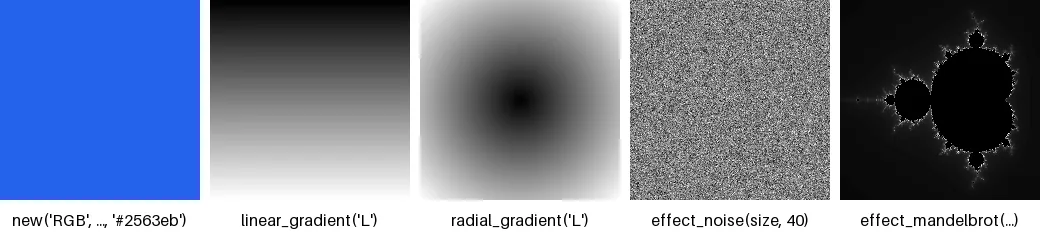
from PIL import Image, ImageDraw, ImageFont

font = ImageFont.load_default(size=16)
tiles = [
    ("new('RGB', ..., '#2563eb')", Image.new("RGB", (200, 200), "#2563eb")),
    ("linear_gradient('L')", Image.linear_gradient("L").resize((200, 200))),
    ("radial_gradient('L')", Image.radial_gradient("L").resize((200, 200))),
    ("effect_noise(size, 40)", Image.effect_noise((200, 200), 40)),
    ("effect_mandelbrot(...)", Image.effect_mandelbrot((200, 200), (-2.0, -1.25, 0.75, 1.25), 100)),
]
sheet = Image.new("RGB", (5 * 210, 236), "white")
for i, (label, im) in enumerate(tiles):
    sheet.paste(im.convert("RGB"), (i * 210, 0))
    ImageDraw.Draw(sheet).text((i * 210 + 100, 220), label, font=font, fill="black", anchor="mm")
sheet.save("create.png")
for label, im in tiles:
print(f"{label:<28} mode {im.mode:<3} size {im.size}")new('RGB', ..., '#2563eb') mode RGB size (200, 200)
linear_gradient('L') mode L size (200, 200)
radial_gradient('L') mode L size (200, 200)
effect_noise(size, 40) mode L size (200, 200)
effect_mandelbrot(...) mode L size (200, 200)The gradients are always 256×256 in mode L (or P/I/F when asked);
resize and colourise them with ImageOps.colorize for
backgrounds.
open() is lazy: see it
Opening reads only the header; decoding happens on first use. On a 6000×4000 JPEG:
import time
from PIL import Image

Image.open("photo.jpg").resize((6000, 4000)).save("big.jpg", quality=90)

t = time.perf_counter()
img = Image.open("big.jpg")
print(f"open():  {(time.perf_counter() - t) * 1000:6.1f} ms  ->", img.format, img.size, img.mode)

t = time.perf_counter()
img.load()
print(f"load(): {(time.perf_counter() - t) * 1000:6.1f} ms (pixels decoded now)")open(): 0.2 ms -> JPEG (6000, 4000) RGB
load(): 81.4 ms (pixels decoded now)So reading the size or format of thousands of files is fast, as long as you do not touch the pixels. Use
with Image.open(...) as img: in loops so files are closed (see batch
processing).
NumPy arrays: the dtype must be right
Image.fromarray() picks the mode from the array's shape and dtype. Colour images need uint8; a float
array (the default from most maths) fails:
import numpy as np
from PIL import Image

arr = np.random.rand(100, 100, 3)          # float64 values in 0..1
Image.fromarray(arr)TypeError: Cannot handle this data type: (1, 1, 3), <f8import numpy as np
from PIL import Image
arr = np.random.default_rng(0).random((100, 100, 3)) # float64, 0..1
img = Image.fromarray((arr * 255).round().astype(np.uint8))
print(img.mode, img.size)
back = np.asarray(img)
print(back.shape, back.dtype) # (height, width, channels)RGB (100, 100)
(100, 100, 3) uint8NumPy arrays are (height, width, channels), while Pillow sizes are (width, height).
Counting colours: why getcolors() returns None
from PIL import Image

photo = Image.open("photo.jpg")
print("getcolors()           ->", photo.getcolors())            # more than 256 colours: None, not an error
colours = photo.getcolors(maxcolors=photo.width * photo.height)  # enough room for every pixel
print("getcolors(all pixels) ->", len(colours), "distinct colours")
count, rgb = max(colours)
print("most common colour:", rgb, "used by", count, "pixels")
print("logo:", len(Image.open("logo.png").getcolors()), "colours, default limit is enough")getcolors() -> None
getcolors(all pixels) -> 137168 distinct colours
most common colour: (2, 2, 2) used by 133360 pixels
logo: 85 colours, default limit is enoughgetcolors() stops counting at maxcolors (256 by default) and returns None, not an
error, when there are more. Pass a limit at least as large as the number of pixels. For the main colours of a photo, see
counting and changing colours.
Inspecting an image
from PIL import Image

logo = Image.open("logo.png")                                      # RGBA, transparent corners
print("getbands():", logo.getbands())
print("getbbox():", logo.getbbox(), "  (alpha_only=False):", logo.getbbox(alpha_only=False))
print("getextrema():", logo.getextrema())
print("has_transparency_data:", logo.has_transparency_data)

grey = Image.open("photo.jpg").convert("L")
print("histogram length, L:", len(grey.histogram()), " RGB:", len(grey.convert("RGB").histogram()))
print("entropy (bits per pixel):", round(grey.entropy(), 2))
cols, rows = grey.point(lambda v: 255 if v > 200 else 0).getprojection()
print("getprojection: columns with bright pixels", sum(cols), "of", len(cols))getbands(): ('R', 'G', 'B', 'A')
getbbox(): (20, 20, 581, 341) (alpha_only=False): (20, 20, 581, 341)
getextrema(): ((0, 255), (0, 255), (0, 255), (0, 255))
has_transparency_data: True
histogram length, L: 256 RGB: 768
entropy (bits per pixel): 7.22
getprojection: columns with bright pixels 980 of 1600getbbox() ignores fully transparent pixels by default, so on a logo it gives the box of what is visible; that is
how auto-cropping works. entropy() measures detail (8 is the maximum for 8-bit data), and
getprojection() says which columns and rows contain non-zero pixels. Embedded XMP metadata is read with
getxmp() (it needs the defusedxml package; see metadata).
Channels: split, merge, getchannel, putalpha
from PIL import Image

img = Image.open("photo.jpg")
r, g, b = img.split()
print("split():", [band.mode for band in (r, g, b)])
print("getchannel('G') same as split()[1]:", img.getchannel("G").tobytes() == g.tobytes())
swapped = Image.merge("RGB", (b, g, r))                         # BGR <-> RGB, as OpenCV does
print("merge(b, g, r) pixel:", img.getpixel((690, 600)), "->", swapped.getpixel((690, 600)))
rgba = img.copy()
rgba.putalpha(128)                                              # in place: now RGBA, half transparent
print("putalpha(128):", rgba.mode, rgba.getpixel((0, 0)))split(): ['L', 'L', 'L']
getchannel('G') same as split()[1]: True
merge(b, g, r) pixel: (79, 55, 11) -> (11, 55, 79)
putalpha(128): RGBA (58, 56, 70, 128)Raw bytes: frombytes, frombuffer, tobytes
from PIL import Image

data = bytearray([16] * 12)                                     # 4 x 3 greyscale pixels
copied = Image.frombytes("L", (4, 3), bytes(data))              # copies the bytes
shared = Image.frombuffer("L", (4, 3), data, "raw", "L", 0, 1)  # uses the same memory
data[0] = 200
print("after changing the buffer: frombytes", copied.getpixel((0, 0)), " frombuffer", shared.getpixel((0, 0)))
print("tobytes() length:", len(copied.tobytes()), "=", copied.width, "x", copied.height, "x 1 byte")after changing the buffer: frombytes 16 frombuffer 200
tobytes() length: 12 = 4 x 3 x 1 bytefrombuffer() wraps existing memory (for the raw decoder and a few modes) instead of copying it, which
is faster for large camera frames but means later changes to the buffer show up in the image. tobytes() gives raw
pixels, not a file; to get PNG or JPEG bytes, save to a BytesIO.
Palettes: apply_transparency, remap_palette
from PIL import Image

p = Image.open("logo.png").convert("P", palette=Image.Palette.ADAPTIVE, colors=8)
p.info["transparency"] = 0                                    # palette index 0 is transparent
print("before:", p.mode, "palette mode", p.palette.mode, "transparency", p.info.get("transparency"))
p.apply_transparency()                                          # move it into an RGBA palette
print("after: ", p.mode, "palette mode", p.palette.mode, "transparency", p.info.get("transparency"))

q = Image.open("logo.png").convert("P", palette=Image.Palette.ADAPTIVE, colors=8)
order = list(range(8))[::-1]
r = q.remap_palette(order)                                     # same picture, palette entries reversed
print("remap_palette: same look:", r.convert("RGB").tobytes() == q.convert("RGB").tobytes(),
" index at (300, 180):", q.getpixel((300, 180)), "->", r.getpixel((300, 180)))before: P palette mode RGBA transparency 0
after: P palette mode RGBA transparency None
remap_palette: same look: True index at (300, 180): 7 -> 0putpalette() and getpalette() set and read the colour table directly; see
P vs L for how palette images work.
Coordinate system: origin, (x, y) order and boxes
import numpy as np
from PIL import Image, ImageDraw

img = Image.new("L", (4, 3), 0)                          # 4 pixels wide, 3 tall
img.putpixel((3, 0), 255)                                 # (x, y): x to the right, y downwards, from the top-left
a = np.asarray(img)
print("img.size (width, height):", img.size, "| NumPy shape (height, width):", a.shape)
print("img.getpixel((3, 0)):", img.getpixel((3, 0)), "| a[0, 3] (row first):", a[0, 3])

print("crop((0, 0, 2, 2)).size:", img.crop((0, 0, 2, 2)).size, "  (right and lower edges are excluded)")
print("getbbox() of the one white pixel:", img.getbbox(), "  (same convention)")
pasted = Image.new("L", (6, 6), 0)
pasted.paste(255, (1, 1, 3, 3))
print("paste(255, (1, 1, 3, 3)) fills", int((np.asarray(pasted) == 255).sum()), "pixels")

drawn = Image.new("L", (6, 6), 0)
ImageDraw.Draw(drawn).rectangle((1, 1, 3, 3), fill=255)
print("ImageDraw rectangle((1, 1, 3, 3)) fills", int((np.asarray(drawn) == 255).sum()), "pixels  (ImageDraw includes both ends)")
print("crop((-2, -2, 2, 2)):", img.crop((-2, -2, 2, 2)).size, "outside the image is filled with", np.asarray(img.crop((-2, -2, 2, 2)))[0, 0])img.size (width, height): (4, 3) | NumPy shape (height, width): (3, 4)
img.getpixel((3, 0)): 255 | a[0, 3] (row first): 255
crop((0, 0, 2, 2)).size: (2, 2) (right and lower edges are excluded)
getbbox() of the one white pixel: (3, 0, 4, 1) (same convention)
paste(255, (1, 1, 3, 3)) fills 4 pixels
ImageDraw rectangle((1, 1, 3, 3)) fills 9 pixels (ImageDraw includes both ends)
crop((-2, -2, 2, 2)): (4, 4) outside the image is filled with 0- Origin:
(0, 0)is the top-left pixel; x grows to the right, y downwards. - Order: Pillow takes
(x, y)and reports size as(width, height); NumPy indexes[row, column]=[y, x]and its shape is(height, width). Mixing the two is the classic transposed-image bug. - Boxes:
crop(),paste()andgetbbox()use(left, upper, right, lower)with the right and lower edges excluded, so width isright - left.ImageDrawshapes include both ends, so the same box draws one pixel wider and taller (see drawing coordinates). - Outside the image:
crop()accepts boxes that extend past the edges and fills the outside with zeros (black, or transparent for RGBA).
crop(): exclusive edges and out-of-bounds boxes
from PIL import Image

img = Image.open("photo.jpg")                 # 1600 x 1067
box = (100, 50, 500, 350)                     # (left, upper, right, lower)
print(img.crop(box).size)                     # right and lower are exclusive: 400 x 300

edge = img.crop((1500, 1000, 1700, 1100))     # partly outside the image
print(edge.size, edge.getpixel((199, 99))) # outside area is filled with black(400, 300)
(200, 100) (0, 0, 0)The right and lower edges are exclusive, so the size is simply (right - left, lower - upper). Areas outside the
image are filled with black (or transparent, for RGBA) rather than raising an error.
rotate(): expand and fillcolor
from PIL import Image

img = Image.open("photo.jpg").resize((400, 267))
a = img.rotate(20)                                        # same size, corners cut off
b = img.rotate(20, expand=True, fillcolor="white")        # canvas grows to fit
print(a.size, b.size)

sheet = Image.new("RGB", (a.width + b.width + 20, b.height), "white")
sheet.paste(a, (0, (b.height - a.height) // 2))
sheet.paste(b, (a.width + 20, 0))
sheet.save("rotate.png")(400, 267) (468, 389)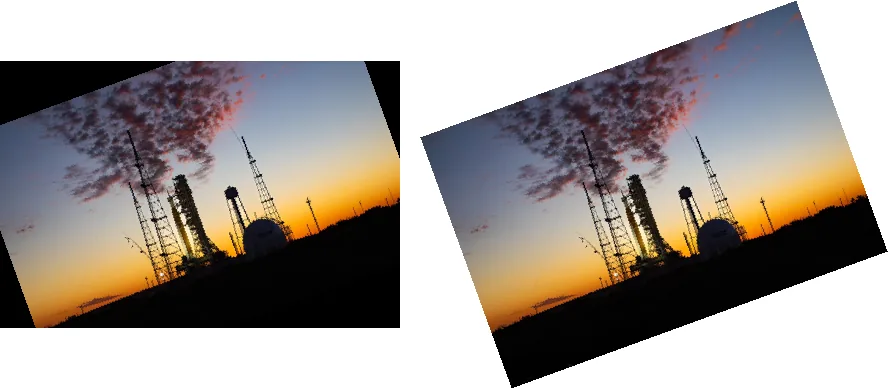
convert(): what each mode looks like

from PIL import Image, ImageDraw, ImageFont

src = Image.open("photo.jpg").resize((320, 213))
variants = {
    '"L"': src.convert("L"),
    '"1" (dithered)': src.convert("1"),
    '"1", dither=NONE': src.convert("1", dither=Image.Dither.NONE),
    '"P", 8 colours': src.convert("P", palette=Image.Palette.ADAPTIVE, colors=8),
}
font = ImageFont.load_default(size=18)
sheet = Image.new("RGB", (4 * 330, 250), "white")
for i, (label, im) in enumerate(variants.items()):
    sheet.paste(im.convert("RGB"), (i * 330, 0))
    ImageDraw.Draw(sheet).text((i * 330 + 160, 225), label, font=font, fill="black", anchor="mm")
sheet.save("modes.png")convert("1") dithers by default. For a hard threshold pass dither=Image.Dither.NONE; the
black and white tool lets you compare methods on your own image.
Reading pixels: getpixel() vs load() vs NumPy
Summing every pixel of a 1600×1067 greyscale image three ways:
import time
import numpy as np
from PIL import Image

img = Image.open("photo.jpg").convert("L")     # 1600 x 1067 = 1.7 million pixels


def timed(label, fn):
    t = time.perf_counter(); result = fn(); print(f"{label:<22} {(time.perf_counter() - t) * 1000:8.1f} ms"); return result


def with_getpixel():
    return sum(img.getpixel((x, y)) for y in range(img.height) for x in range(img.width))

def with_load():
    px = img.load()
    return sum(px[x, y] for y in range(img.height) for x in range(img.width))

def with_numpy():
    return int(np.asarray(img, dtype=np.int64).sum())

a = timed("getpixel()", with_getpixel)
b = timed("load() pixel access", with_load)
c = timed("numpy", with_numpy)
print("same result:", a == b == c)getpixel() 594.1 ms
load() pixel access 65.9 ms
numpy 55.0 ms
same result: TrueFor bulk work, convert to an array or use a built-in operation such as point(), which runs in C.
Every function, method and attribute in Pillow 13.0.0
Generated from the installed Pillow when this page was built. The build fails if Pillow adds something we have not described.
Module functions (Image.something) 32
| Name and signature | What it does |
|---|---|
alpha_composite(im1, im2) | Composites one RGBA image over another of the same size, respecting both alpha channels. |
blend(im1, im2, alpha) | Mixes two images of the same size and mode: alpha 0 gives the first, 1 the second. |
composite(image1, image2, mask) | Takes each pixel from the first or second image according to a mask. |
effect_mandelbrot(size, extent, quality) | Generates a Mandelbrot set image. Example |
effect_noise(size, sigma) | Generates greyscale Gaussian noise centred on 128 with the given sigma. Example |
eval(image, *args) | Applies a function to every pixel value (through a lookup table); the same as img.point(func). |
fromarray(obj, mode=None) | Creates an image from a NumPy array (or any object with the array interface); the dtype must fit a mode. Example |
fromarrow(obj, mode, size) | Creates an image from an Apache Arrow array, without copying where possible. |
frombuffer(mode, size, data, decoder_name='raw', *args) | Creates an image that shares memory with a buffer, where possible. Example |
frombytes(mode, size, data, decoder_name='raw', *args) | Creates an image from raw pixel bytes, copying them. Example |
fromqimage(im) | Converts a Qt QImage to a Pillow image (needs PyQt or PySide). |
fromqpixmap(im) | Converts a Qt QPixmap to a Pillow image. |
getmodebandnames(mode) | The band names of a mode, e.g. ('R', 'G', 'B'). |
getmodebands(mode) | The number of bands of a mode. |
getmodebase(mode) | The base mode, either L or RGB. |
getmodetype(mode) | The storage type of a mode, e.g. L for 8-bit, I or F. |
init() | Loads every format plugin. Called automatically when needed; call it yourself before reading Image.OPEN or Image.SAVE. |
linear_gradient(mode) | A 256×256 vertical gradient from black to white. Example |
merge(mode, bands) | Combines single-band images into one multi-band image. Example |
new(mode, size, color=0) | Creates a blank image of a mode, size and colour. |
open(fp, mode='r', formats=None) | Opens an image file or file object lazily; formats limits which formats are tried. Example |
preinit() | Loads the most common format plugins (BMP, GIF, JPEG, PPM, PNG). Called automatically. |
radial_gradient(mode) | A 256×256 gradient from black in the centre to white at the edges. Example |
register_decoder(name, decoder) | For writing format plugins: registers a decoder by name. |
register_encoder(name, encoder) | For writing format plugins: registers an encoder by name. |
register_extension(id, extension) | For writing format plugins: maps a file extension to a format. |
register_extensions(id, extensions) | For writing format plugins: maps several file extensions to a format. |
register_mime(id, mimetype) | For writing format plugins: sets the MIME type of a format. |
register_open(id, factory, accept=None) | For writing format plugins: registers the class that opens a format, and a function that recognises its first bytes. |
register_save(id, driver) | For writing format plugins: registers the function that saves a format. |
register_save_all(id, driver) | For writing format plugins: registers the function that saves all frames of a format. |
registered_extensions() | A dict of every file extension Pillow knows and its format, e.g. '.jpg': 'JPEG'. |
Image methods (img.something) 50
| Name and signature | What it does |
|---|---|
alpha_composite(im, dest=(0, 0), source=(0, 0)) | Composites an RGBA image onto this one in place, at dest, optionally from a source box. |
apply_transparency() | In place: moves a palette image's transparent colour into an RGBA palette. Example |
close() | Closes the file and frees memory; use with Image.open(...) instead where you can. |
convert(mode=None, matrix=None, dither=None, palette=Palette.WEB, colors=256) | Returns a copy in another mode, with optional dithering, palette and matrix. Example |
copy() | Returns an independent copy. |
crop(box=None) | Returns a rectangle (left, top, right, bottom); right and bottom are exclusive. Example |
draft(mode, size) | Asks the JPEG decoder for a smaller or greyscale version before loading, which is much faster. |
effect_spread(distance) | Randomly moves pixels up to distance, a frosted-glass effect. |
entropy(mask=None, extrema=None) | Shannon entropy of the histogram, in bits per pixel: a measure of detail. Example |
filter(filter) | Returns a copy filtered with an ImageFilter. |
frombytes(data, decoder_name='raw', *args) | Loads raw pixel bytes into this image, in place. |
get_flattened_data(band=None) | All pixel values as a flat tuple, row by row (Pillow 12.1+; replaces getdata()). |
getbands() | The band names, e.g. ('R', 'G', 'B', 'A'). Example |
getbbox(*, alpha_only=True) | The box around non-zero pixels; ignores fully transparent pixels unless alpha_only=False. Example |
getchannel(channel) | One band as a greyscale image, by name or index. Example |
getcolors(maxcolors=256) | A list of (count, colour), or None if there are more than maxcolors. Example |
getdata(band=None) | Deprecated since 12.1: the pixels as an internal sequence. Use get_flattened_data(). |
getexif() | The EXIF tags as a dict-like object. Guide |
getextrema() | The (min, max) of each band. |
getim() | A capsule pointing to the internal image memory, for C extensions. |
getpalette(rawmode='RGB') | The palette as a flat list, or None for non-palette images. |
getpixel(xy) | One pixel's value; slow in loops. Measured |
getprojection() | Two lists saying which columns and rows contain non-zero pixels. Example |
getxmp(*, strip_namespaces=True) | Embedded XMP metadata as a dict (needs defusedxml); strip_namespaces is new in Pillow 13. |
histogram(mask=None, extrema=None) | Pixel counts per value, 256 per band for 8-bit images; optional mask. |
load() | Decodes the pixels now and returns a fast pixel-access object. Measured |
paste(im, box=None, mask=None) | In place: pastes an image or colour into a box, optionally through a mask. Returns None |
point(lut, mode=None) | Maps every value through a function or lookup table; fast, runs in C. |
putalpha(alpha) | In place: adds or replaces the alpha channel (converting to RGBA or LA). Example |
putdata(data, scale=1.0, offset=0.0) | In place: replaces pixels from a sequence, with optional scale and offset. |
putpalette(data, rawmode='RGB') | In place: sets the colour table of a palette (or L) image. |
putpixel(xy, value) | In place: sets one pixel; slow in loops. |
quantize(colors=256, method=None, kmeans=0, palette=None, dither=Dither.FLOYDSTEINBERG) | Returns a palette (P) copy with at most colors colours, optionally dithered. |
reduce(factor, box=None) | Shrinks by an integer factor by averaging blocks; very fast. |
remap_palette(dest_map, source_palette=None) | Returns a copy with palette entries reordered, keeping the picture. Example |
resize(size, resample=None, box=None, reducing_gap=None) | Returns a copy at a new size with a resampling filter. Filters compared |
rotate(angle, resample=Resampling.NEAREST, expand=False, center=None, translate=None, fillcolor=None) | Returns a copy rotated counter-clockwise by degrees; expand=True keeps the corners. Example |
save(fp, format=None, **params) | Writes to a file or file object; options depend on the format. Formats |
seek(frame) | Moves to another frame of an animated or multi-page image. |
show(title=None) | Opens the image in the system viewer (a temporary PNG). Guide |
split() | One greyscale image per band. Example |
tell() | The current frame number. |
thumbnail(size, resample=Resampling.BICUBIC, reducing_gap=2.0) | In place: shrinks to fit a box, keeping the aspect ratio; never enlarges. Returns None |
tobitmap(name='image') | The image as an X11 bitmap (XBM) string; 1-bit images only. |
tobytes(encoder_name='raw', *args) | The raw pixel bytes. Example |
toqimage() | Converts to a Qt QImage. |
toqpixmap() | Converts to a Qt QPixmap. |
transform(size, method, data=None, resample=Resampling.NEAREST, fill=1, fillcolor=None) | Returns a copy transformed with an affine, perspective, quad or mesh mapping. Guide |
transpose(method) | Returns a copy flipped or rotated by a multiple of 90 degrees (lossless). |
verify() | Checks a file for damage without decoding it; the image cannot be used afterwards. |
Image attributes 9
| Name and signature | What it does |
|---|---|
format | The file format the image was read from, e.g. 'JPEG'; None for created images. |
format_description | A longer name of the file format. |
has_transparency_data | True if the image has an alpha channel or a transparent colour. |
height | Height in pixels. |
im | The internal image object (for C extensions). |
mode | The pixel format, e.g. 'RGB', 'L', 'RGBA'. Modes |
readonly | True when the pixels are shared with a buffer and must not be changed. |
size | (width, height) in pixels. |
width | Width in pixels. |
Sources
What this page shows comes from running its code with Pillow 13.0.0. The API details and version history were checked against these primary sources:
Related
The outputs and images on this page are the real results of running every example with Pillow 13.0.0 on Python 3.13 (Linux) on 2026-10-29. Every example is also re-run automatically on macOS (Darwin 25.6.0, Pillow 12.3.0), Linux (Linux 6.17.0-1022-azure, Pillow 12.3.0), Windows (Windows 2025Server, Pillow 12.3.0); the line under each example shows the result per operating system. The DejaVu Sans font files sit next to each script so font examples behave the same everywhere. Sample photos: NASA/Sam Lott, public domain. Spotted something wrong? Tell us.