Blur with img.filter(ImageFilter.GaussianBlur(radius)), sharpen with
ImageFilter.UnsharpMask(radius=2, percent=150, threshold=3), find edges with FIND_EDGES on a
greyscale copy, and remove speckle noise with MedianFilter(3). Convert palette (P) images to
RGB first, and blur transparent images in RGBa mode.
Which filter do I need?
| You want to | Use | Notes |
|---|---|---|
| Soften or blur | GaussianBlur(r) | r is in pixels; scale it with image size. BLUR is a fixed, weak 5×5 kernel. |
| Blur as fast as possible | BoxBlur(r) | Blockier at large radii; measured below. |
| Sharpen a photo | UnsharpMask(radius, percent, threshold) | Tunable; threshold protects skies and skin. SHARPEN is a fixed 3×3 kernel. |
| Remove salt-and-pepper noise | MedianFilter(3) | Slow at large sizes (see chart). Size must be odd. |
| Outline / edge map | FIND_EDGES, CONTOUR | Run on convert("L"); follow with ImageOps.autocontrast. |
| Grow or shrink a mask | MaxFilter(n) / MinFilter(n) | Dilate / erode white areas of an L mask. |
| Your own 3×3 or 5×5 kernel | Kernel(size, weights, scale) | 8-bit modes only. |
The built-in filters side by side
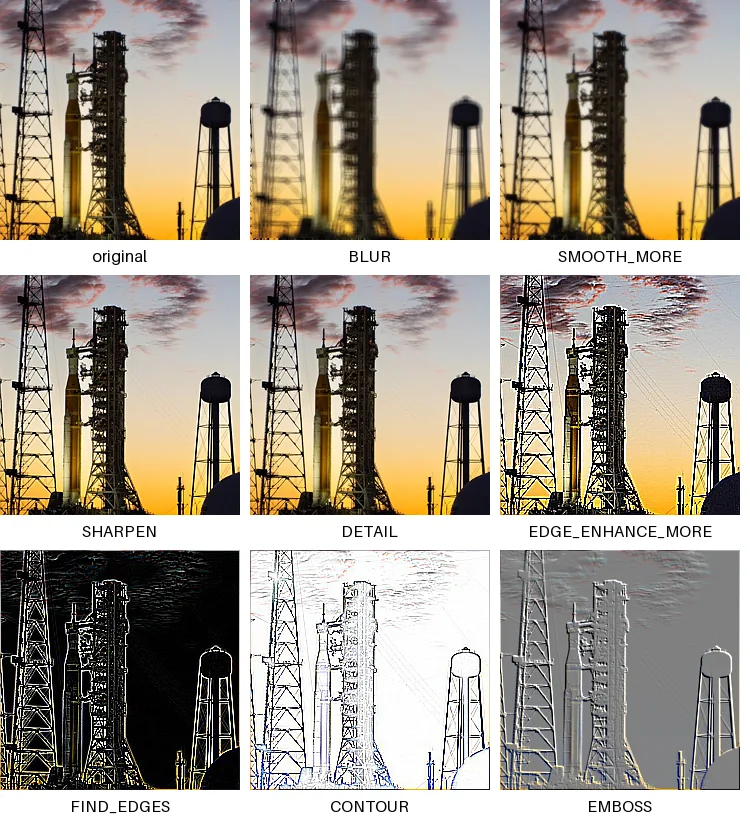
from PIL import Image, ImageDraw, ImageFilter

src = Image.open("photo.jpg").crop((560, 380, 960, 780)).resize((240, 240))
filters = ["BLUR", "SMOOTH_MORE", "SHARPEN", "DETAIL", "EDGE_ENHANCE_MORE",
           "FIND_EDGES", "CONTOUR", "EMBOSS"]
cells = [("original", src)] + [(name, src.filter(getattr(ImageFilter, name))) for name in filters]

cols = 3
sheet = Image.new("RGB", (cols * 250, 3 * 275), "white")
draw = ImageDraw.Draw(sheet)
for i, (label, im) in enumerate(cells):
    x, y = (i % cols) * 250, (i // cols) * 275
    sheet.paste(im, (x, y))
    draw.text((x + 120, y + 256), label, fill="black", anchor="mm", font_size=16)
sheet.save("filters.png")How long each filter takes
Every filter run three times on the full 1600×1067 photo; the chart shows the fastest run of each:
import time
from PIL import Image, ImageFilter

img = Image.open("photo.jpg")                       # 1600 x 1067 RGB
filters = {
    "BLUR": ImageFilter.BLUR, "SHARPEN": ImageFilter.SHARPEN, "DETAIL": ImageFilter.DETAIL,
    "EDGE_ENHANCE": ImageFilter.EDGE_ENHANCE, "FIND_EDGES": ImageFilter.FIND_EDGES,
    "CONTOUR": ImageFilter.CONTOUR, "EMBOSS": ImageFilter.EMBOSS, "SMOOTH": ImageFilter.SMOOTH,
    "GaussianBlur(5)": ImageFilter.GaussianBlur(5), "BoxBlur(5)": ImageFilter.BoxBlur(5),
    "UnsharpMask()": ImageFilter.UnsharpMask(), "MedianFilter(3)": ImageFilter.MedianFilter(3),
    "MedianFilter(7)": ImageFilter.MedianFilter(7),
}
for name, f in filters.items():
    runs = []
    for _ in range(3):
        t = time.perf_counter()
        img.filter(f)
        runs.append((time.perf_counter() - t) * 1000)
print(f"{name:<16} {min(runs):7.1f} ms")The fixed 3×3 kernels (SHARPEN, EMBOSS, CONTOUR…) all cost about the
same, because each is the same small convolution with different weights; BLUR uses a 5×5 kernel and costs two to
three times as much. A median filter has to sort every neighbourhood, so its cost rises with the square of its size.
For large-radius denoising on big images, downscale first or use OpenCV's cv2.medianBlur.
GaussianBlur vs BoxBlur
import time
from PIL import Image, ImageFilter

img = Image.open("photo.jpg")
for radius in [2, 10, 40]:
    times = {}
    for name, f in [("GaussianBlur", ImageFilter.GaussianBlur(radius)), ("BoxBlur", ImageFilter.BoxBlur(radius))]:
        t = time.perf_counter()
        img.filter(f)
        times[name] = (time.perf_counter() - t) * 1000
print(f"radius {radius:>2}: GaussianBlur {times['GaussianBlur']:6.1f} ms BoxBlur {times['BoxBlur']:6.1f} ms")radius 2: GaussianBlur 50.8 ms BoxBlur 18.1 ms
radius 10: GaussianBlur 40.0 ms BoxBlur 18.2 ms
radius 40: GaussianBlur 40.5 ms BoxBlur 18.2 msShow the numbers
| Radius (px) | GaussianBlur | BoxBlur |
|---|---|---|
| 2 px | 50.8 ms | 18.1 ms |
| 10 px | 40.0 ms | 18.2 ms |
| 40 px | 40.5 ms | 18.2 ms |
A single BoxBlur pass is cheaper, but it looks blockier at large radii. Use GaussianBlur unless you
have measured that the difference matters to you.
SHARPEN vs UnsharpMask
from PIL import Image, ImageFilter

src = Image.open("photo.jpg").crop((980, 360, 1100, 480))          # lattice tower detail
variants = [("original", src),
            ("SHARPEN", src.filter(ImageFilter.SHARPEN)),
            ("Unsharp r=2 150%", src.filter(ImageFilter.UnsharpMask(radius=2, percent=150, threshold=3))),
            ("Unsharp r=4 300%", src.filter(ImageFilter.UnsharpMask(radius=4, percent=300, threshold=0)))]
sheet = Image.new("RGB", (4 * 250 - 10, 240), "white")
for i, (label, im) in enumerate(variants):
    sheet.paste(im.resize((240, 240), Image.NEAREST), (i * 250, 0))
sheet.save("unsharp.png")
print([label for label, _ in variants])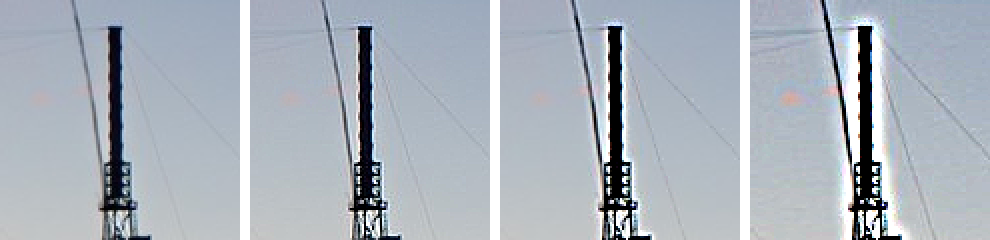
SHARPEN, UnsharpMask(2, 150, 3), UnsharpMask(4, 300, 0).radius sets the size of the detail that gets sharpened, percent the strength, and
threshold the smallest difference that is touched at all, which keeps noise and smooth gradients clean. Halos along
edges, as on the right, mean the settings are too strong.
Removing speckle noise: MedianFilter
import random
from PIL import Image, ImageFilter

clean = Image.open("photo.jpg").convert("L").resize((400, 267))
noisy = clean.copy()
px = noisy.load()
random.seed(1)
for _ in range(4000):                                              # salt-and-pepper noise
    px[random.randrange(400), random.randrange(267)] = random.choice((0, 255))


def err(a, b):
    return sum(abs(x - y) for x, y in zip(a.get_flattened_data(), b.get_flattened_data())) / (a.width * a.height)


for name, out in [("noisy", noisy), ("GaussianBlur(1)", noisy.filter(ImageFilter.GaussianBlur(1))),
                  ("MedianFilter(3)", noisy.filter(ImageFilter.MedianFilter(3)))]:
print(f"{name:<16} mean error vs clean: {err(out, clean):5.2f}")noisy mean error vs clean: 4.66
GaussianBlur(1) mean error vs clean: 6.36
MedianFilter(3) mean error vs clean: 2.09A blur only smears isolated black and white specks around; a median replaces each pixel with the middle value of its neighbours, so outliers vanish. Measured against the clean image, the median result is about three times closer than the blur, and the blur actually ended up further from the clean image than the noisy input it started from.
Blurring transparent images without dark edges
from PIL import Image, ImageDraw, ImageFilter

disc = Image.new("RGBA", (100, 100), (0, 0, 0, 0))                # transparent pixels store black
ImageDraw.Draw(disc).ellipse((20, 20, 80, 80), fill=(255, 255, 255, 255))

straight = disc.filter(ImageFilter.GaussianBlur(6))
premult = disc.convert("RGBa").filter(ImageFilter.GaussianBlur(6)).convert("RGBA")
print("edge pixel, blurred as RGBA:", straight.getpixel((50, 17)))
print("edge pixel, blurred as RGBa:", premult.getpixel((50, 17)))edge pixel, blurred as RGBA: (80, 80, 80, 80)
edge pixel, blurred as RGBa: (255, 255, 255, 80)Fully transparent pixels still store a colour, usually black, and a plain RGBA blur mixes it into the edge. Premultiplied
alpha (RGBa) weights each colour by its opacity, so the edge stays white. Convert, filter, convert back.
Your own kernels: Kernel
Kernel(size, weights, scale, offset) runs any 3×3 or 5×5 convolution. Each output pixel is the
weighted sum of its neighbourhood, divided by scale (by default the sum of the weights, so a blur keeps the brightness)
plus offset. Kernels whose weights sum to zero, such as edge detectors, need scale=1, and an
offset of 128 when negative values should stay visible, as in the emboss:
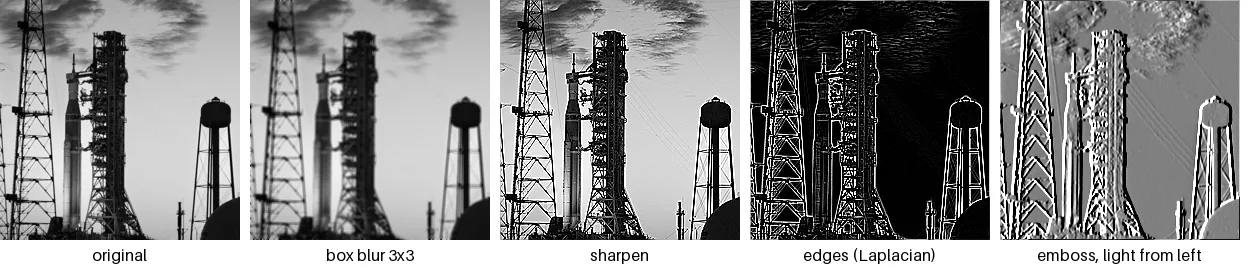
from PIL import Image, ImageDraw, ImageFilter, ImageFont

src = Image.open("photo.jpg").convert("L").crop((560, 380, 960, 780)).resize((240, 240))
kernels = {
    "box blur 3x3": ImageFilter.Kernel((3, 3), [1] * 9),                        # scale defaults to the sum: 9
    "sharpen": ImageFilter.Kernel((3, 3), [0, -1, 0, -1, 5, -1, 0, -1, 0]),
    "edges (Laplacian)": ImageFilter.Kernel((3, 3), [-1, -1, -1, -1, 8, -1, -1, -1, -1], scale=1),
    "emboss, light from left": ImageFilter.Kernel((3, 3), [1, 0, -1, 2, 0, -2, 1, 0, -1], scale=1, offset=128),
}
font = ImageFont.load_default(size=16)
sheet = Image.new("L", (5 * 250, 270), 255)
for i, (label, im) in enumerate([("original", src)] + [(k, src.filter(v)) for k, v in kernels.items()]):
    sheet.paste(im, (i * 250, 0))
    ImageDraw.Draw(sheet).text((i * 250 + 120, 255), label, font=font, fill=0, anchor="mm")
sheet.save("kernels.png")
big = ImageFilter.Kernel((7, 7), [1] * 49)       # creating it works...
try:
    src.filter(big)                                # ...applying it does not
except ValueError as e:
print("7x7 kernel when applied:", e)7x7 kernel when applied: bad kernel sizeOnly 3×3 and 5×5 are supported, and Pillow only checks when the filter is applied: a 7×7
Kernel is created without complaint and fails later, inside filter(). For larger kernels (and for code ported from the removed
scipy.misc functions), use
scipy.ndimage.convolve on a NumPy array.
Rank filters: RankFilter, ModeFilter, Min and Max
Rank filters sort each neighbourhood and pick one value: the smallest (MinFilter), the middle
(MedianFilter), the largest (MaxFilter), or any position (RankFilter(size, rank)).
ModeFilter picks the most common value instead, which never invents a value that was not there. That makes it the
right filter for label masks and posterised images:
import random
from PIL import Image, ImageDraw, ImageFilter

# A segmentation mask (two labels) with 400 stray pixels of the wrong label
mask = Image.new("L", (200, 200), 0)
ImageDraw.Draw(mask).ellipse((40, 40, 160, 160), fill=200)
random.seed(3)
px = mask.load()
for _ in range(400):
    x, y = random.randrange(200), random.randrange(200)
    px[x, y] = 200 - px[x, y]
clean = Image.new("L", (200, 200), 0)
ImageDraw.Draw(clean).ellipse((40, 40, 160, 160), fill=200)


def wrong(im):
    return sum(a != b for a, b in zip(im.get_flattened_data(), clean.get_flattened_data()))


print("stray pixels before:", wrong(mask))
for name, f in [("ModeFilter(3)", ImageFilter.ModeFilter(3)), ("MedianFilter(3)", ImageFilter.MedianFilter(3)),
                ("RankFilter(3, 4)", ImageFilter.RankFilter(3, 4)), ("MinFilter(3)", ImageFilter.MinFilter(3)),
                ("MaxFilter(3)", ImageFilter.MaxFilter(3))]:
    out = f and mask.filter(f)
print(f"{name:<17} wrong pixels: {wrong(out):5} labels used: {sorted(set(out.get_flattened_data()))}")stray pixels before: 396
ModeFilter(3) wrong pixels: 6 labels used: [0, 200]
MedianFilter(3) wrong pixels: 6 labels used: [0, 200]
RankFilter(3, 4) wrong pixels: 6 labels used: [0, 200]
MinFilter(3) wrong pixels: 1486 labels used: [0, 200]
MaxFilter(3) wrong pixels: 2872 labels used: [0, 200]Mode and median both remove almost every stray pixel (RankFilter(3, 4) is the median: rank 4 is the middle of 9
sorted values). Min and max each remove one kind of stray pixel but also shrink or grow the disc itself, so many more pixels end
up wrong. With more than two labels the median can produce in-between values that are not valid labels, while the mode cannot.
Min and max are how you deliberately shrink (erode) and grow (dilate) masks:
from PIL import Image, ImageDraw, ImageFilter

mask = Image.new("L", (100, 100), 0)
ImageDraw.Draw(mask).rectangle((40, 40, 59, 59), fill=255)       # a 20 x 20 white square
for name, f in [("MaxFilter(5)", ImageFilter.MaxFilter(5)), ("MinFilter(5)", ImageFilter.MinFilter(5))]:
    box = mask.filter(f).getbbox()
print(f"{name}: white area {box[2] - box[0]} x {box[3] - box[1]}")MaxFilter(5): white area 24 x 24
MinFilter(5): white area 16 x 16Colour grading with a 3D lookup table: Color3DLUT
A Color3DLUT maps every input colour to an output colour through a small colour cube, interpolating between the
points. It is how film looks and colour grades are stored (.cube files), and it applies any colour function in one
fast pass:
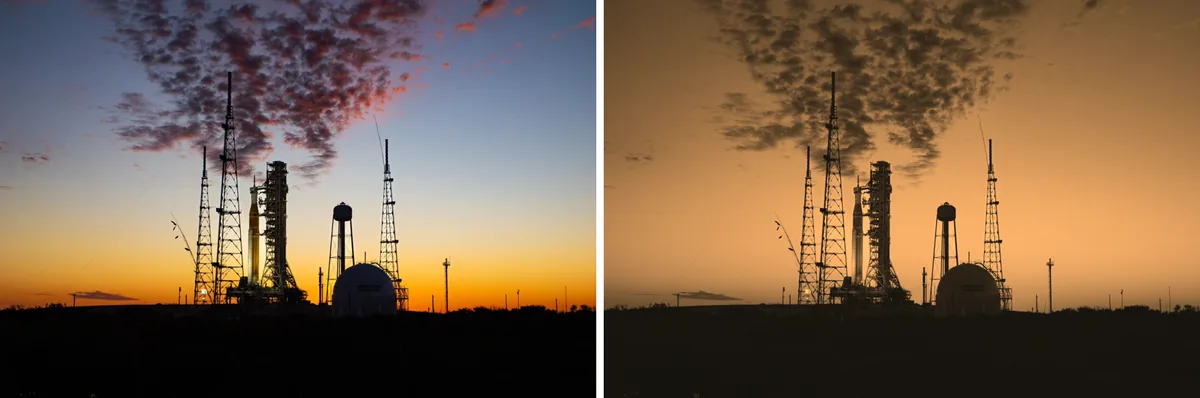
from PIL import Image, ImageFilter

photo = Image.open("photo.jpg").resize((800, 534))


def sepia(r, g, b):                               # values arrive and leave as floats in 0..1
    y = 0.299 * r + 0.587 * g + 0.114 * b
    return min(1, y * 1.07 + 0.08), min(1, y * 0.74 + 0.07), min(1, y * 0.43 + 0.05)


lut = ImageFilter.Color3DLUT.generate(17, sepia)   # a 17 x 17 x 17 colour cube
graded = photo.filter(lut)
print("LUT size:", lut.size, " table entries:", len(lut.table) // 3)
print("pixel", photo.getpixel((400, 300)), "->", graded.getpixel((400, 300)))
side = Image.new("RGB", (1610, 534), "white")
side.paste(photo, (0, 0)); side.paste(graded, (810, 0))
side.save("lut.png")LUT size: (17, 17, 17) table entries: 4913
pixel (226, 209, 182) -> (246, 174, 103)generate() calls your function once per cube point (17³ = 4,913 times here), not once per pixel. Bigger cubes
follow the function more exactly; 17 or 33 points per side are common sizes for .cube files.
Which modes can be filtered
from PIL import Image, ImageFilter

photo = Image.open("photo.jpg")
for mode in ["RGB", "L", "RGBA", "P", "1", "I;16", "F"]:
    img = photo.convert("I").convert("I;16") if mode == "I;16" else photo.convert(mode)
    row = []
    for f in [ImageFilter.SHARPEN, ImageFilter.GaussianBlur(2), ImageFilter.MedianFilter(3)]:
        try:
            img.filter(f)
            row.append("ok")
        except ValueError as e:
            row.append(str(e))
print(f"{mode:<5}", " | ".join(f"{r:<27}" for r in row))RGB ok | ok | ok
L ok | ok | ok
RGBA ok | ok | ok
P cannot filter palette images | image has wrong mode | cannot filter palette images
1 ok | image has wrong mode | ok
I;16 ok | image has wrong mode | image has wrong mode
F image has wrong mode | image has wrong mode | okPalette images cannot be filtered at all: convert to RGB or RGBA first. GaussianBlur
needs 8-bit channels, so it rejects 1-bit, 16-bit and float images too; for those, scipy.ndimage works on the
NumPy array directly (see Pillow and NumPy).
All ImageFilter filters in Pillow 13.0.0
Generated from the installed Pillow when this page was built. Filter, MultibandFilter and
BuiltinFilter are the base classes for writing your own filters and are not listed.
Filters 20
| Name and signature | What it does |
|---|---|
BLUR() | A fixed, mild 5×5 blur. |
BoxBlur(radius) | Averages a square of (2 × radius + 1) pixels; the fastest blur. Timed |
Color3DLUT(size, table, channels=3, target_mode=None, **kwargs) | Maps colours through a 3D lookup table, for colour grading. Example |
CONTOUR() | A fixed kernel that draws dark outlines on a light background. |
DETAIL() | A fixed kernel that slightly enhances fine detail. |
EDGE_ENHANCE() | Strengthens edges while keeping the image. |
EDGE_ENHANCE_MORE() | A stronger version of EDGE_ENHANCE. |
EMBOSS() | A fixed kernel that makes the image look embossed, lit from the top left. |
FIND_EDGES() | A fixed kernel that keeps only edges; works best on greyscale. |
GaussianBlur(radius=2) | A smooth blur; radius is the standard deviation in pixels. Timed |
Kernel(size, kernel, scale=None, offset=0) | Any 3×3 or 5×5 convolution with your own weights, scale and offset. Example |
MaxFilter(size=3) | The largest value in each neighbourhood: grows bright areas (dilation). Example |
MedianFilter(size=3) | The middle value in each neighbourhood: removes speckle noise. Example |
MinFilter(size=3) | The smallest value in each neighbourhood: shrinks bright areas (erosion). |
ModeFilter(size=3) | The most common value in each neighbourhood; never invents values, so it suits label masks. |
RankFilter(size, rank) | The value at position rank in each sorted neighbourhood; the general form of min, median and max. |
SHARPEN() | A fixed 3×3 sharpening kernel. |
SMOOTH() | A fixed, mild smoothing kernel. |
SMOOTH_MORE() | A stronger version of SMOOTH. |
UnsharpMask(radius=2, percent=150, threshold=3) | Tunable sharpening: radius, percent strength and a threshold that protects smooth areas. Example |
Sources
What this page shows comes from running its code with Pillow 13.0.0. The API details and version history were checked against these primary sources:
Related
The outputs and images on this page are the real results of running every example with Pillow 13.0.0 on Python 3.13 (Linux) on 2026-10-29. Every example is also re-run automatically on macOS (Darwin 25.6.0, Pillow 12.3.0), Linux (Linux 6.17.0-1022-azure, Pillow 12.3.0), Windows (Windows 2025Server, Pillow 12.3.0); the line under each example shows the result per operating system. The DejaVu Sans font files sit next to each script so font examples behave the same everywhere. Sample photos: NASA/Sam Lott, public domain. Spotted something wrong? Tell us.