Replace w, h = draw.textsize(text, font=font) with:
left, top, right, bottom = draw.textbbox((0, 0), text, font=font)
w, h = right - left, bottom - top
For font.getsize(text), use font.getbbox(text) the same way, or font.getlength(text) if you only need the width.
What the error looks like
from PIL import Image, ImageDraw, ImageFont

img = Image.new("RGB", (400, 120), "white")
draw = ImageDraw.Draw(img)
font = ImageFont.truetype("DejaVuSans.ttf", 40)

w, h = draw.textsize("Hello, Pillow", font=font)AttributeError: 'ImageDraw' object has no attribute 'textsize'The font method fails the same way:
from PIL import ImageFont

font = ImageFont.truetype("DejaVuSans.ttf", 40)
w, h = font.getsize("Hello, Pillow")AttributeError: 'FreeTypeFont' object has no attribute 'getsize'Why it was removed
textsize() returned one width and one height, which hid two things: where the ink actually starts (text
rarely starts exactly at the point you draw it), and how wide the text is for layout purposes (its advance,
which includes side bearings and can differ from the ink width). The newer methods return each of these explicitly.
| Version | Change |
|---|---|
| 8.0.0 (2020) | textbbox(), multiline_textbbox(), textlength(), FreeTypeFont.getbbox() and getlength() added. |
| 9.2.0 (2022) | textsize(), multiline_textsize(), getsize(), getoffset() and getsize_multiline() deprecated. |
| 10.0.0 (1 July 2023) | All of them removed. |
Replacement for every removed method
| Removed | Use instead |
|---|---|
draw.textsize(text, font) | draw.textbbox((0, 0), text, font=font) for the ink box, or draw.textlength(text, font=font) for the width |
draw.multiline_textsize(text, font) | draw.multiline_textbbox((0, 0), text, font=font) |
font.getsize(text) | font.getbbox(text) or font.getlength(text) |
font.getoffset(text) | the first two values of font.getbbox(text) |
font.getsize_multiline(text) | draw.multiline_textbbox((0, 0), text, font=font) |
textbbox vs textlength: what the numbers mean
from PIL import Image, ImageDraw, ImageFont

img = Image.new("RGB", (400, 120), "white")
draw = ImageDraw.Draw(img)
font = ImageFont.truetype("DejaVuSans.ttf", 40)
text = "Hello, Pillow"

left, top, right, bottom = draw.textbbox((0, 0), text, font=font)
print("textbbox:  ", (left, top, right, bottom))
print("ink size:  ", right - left, "x", bottom - top)
print("textlength:", draw.textlength(text, font=font))textbbox: (0, 8, 241, 43)
ink size: 241 x 35
textlength: 240.578125Read the output like this:
textbboxis the rectangle the ink covers, relative to the point you passed. The non-zerotopmeans the tallest glyph starts below that point, because the default anchor is the top of the ascender line, not the top of the letters.textlengthis the advance width: how far the pen moves. Use it to place the next word or to wrap lines. It is a float with 1/64 px precision.
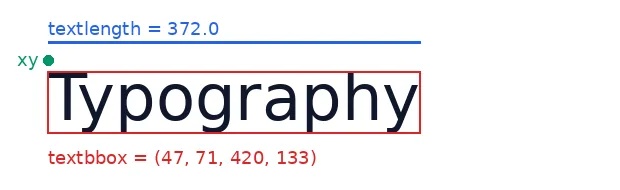
textbbox, the blue line is textlength, the green dot is the xy you pass to draw.text().from PIL import Image, ImageDraw, ImageFont
font = ImageFont.truetype("DejaVuSans.ttf", 64)
label = ImageFont.truetype("DejaVuSans.ttf", 18)
text = "Typography"
img = Image.new("RGB", (620, 190), "white")
draw = ImageDraw.Draw(img)
x, y = 48, 60
draw.text((x, y), text, font=font, fill="#0f172a")
box = draw.textbbox((x, y), text, font=font)
draw.rectangle(box, outline="#dc2626", width=2)
adv = draw.textlength(text, font=font)
draw.line((x, y - 18, x + adv, y - 18), fill="#2563eb", width=3)
draw.ellipse((x - 5, y - 5, x + 5, y + 5), fill="#059669")
draw.text((x, 18), f"textlength = {adv:.1f}", font=label, fill="#2563eb")
draw.text((x, box[3] + 14), f"textbbox = {box}", font=label, fill="#dc2626")
draw.text((x - 10, y), "xy", font=label, fill="#059669", anchor="rm")
img.save("bbox.png")A drop-in replacement for textsize()
If you are upgrading a large codebase, add one helper and replace calls mechanically:
from PIL import Image, ImageDraw, ImageFont


def text_size(draw, text, font, **kwargs):
    """(width, height) of text, as the removed draw.textsize() returned."""
    left, top, right, bottom = draw.textbbox((0, 0), text, font=font, **kwargs)
    return right - left, bottom - top


draw = ImageDraw.Draw(Image.new("RGB", (1, 1)))
font = ImageFont.truetype("DejaVuSans.ttf", 40)
print(text_size(draw, "Hello, Pillow", font))
print(text_size(draw, "Two\nlines", font)) # multiline works too(241, 35)
(94, 71)Sizes can be a pixel or two different from what textsize() returned on Pillow 9, because the bounding box measures
the actual ink. That is usually an improvement, but check pixel-exact layouts after upgrading.
If you only have a font object (no image), use the font methods directly:
from PIL import ImageFont

font = ImageFont.truetype("DejaVuSans.ttf", 40)

# No Image or Draw object needed:
print(font.getbbox("Hello, Pillow"))     # replaces font.getsize() / font.getoffset()
print(font.getlength("Hello, Pillow")) # advance width, for layout and wrapping(0, 8, 241, 43)
240.578125The centring bug after switching
The most common regression: code that centred text using the old size now draws it slightly too low. The bounding box
has a top offset, and using only bottom - top as the height ignores it. Here are three approaches
side by side, rendered by the script below:

anchor="mm". 3: bbox offset subtracted, ink exactly centred.from PIL import Image, ImageDraw, ImageFont
font = ImageFont.truetype("DejaVuSans.ttf", 56)
small = ImageFont.truetype("DejaVuSans.ttf", 16)
text = "Pillow 10"
W, H = 360, 200
def panel(title):
img = Image.new("RGB", (W, H), "#f1f5f9")
d = ImageDraw.Draw(img)
d.line((W / 2, 0, W / 2, H), fill="#94a3b8")
d.line((0, H / 2, W, H / 2), fill="#94a3b8")
d.text((10, 8), title, font=small, fill="#475467")
return img, d
# 1. Wrong: uses the bbox size but ignores its top offset, so the text sits low.
a, d = panel("1. size only: too low")
l, t, r, b = d.textbbox((0, 0), text, font=font)
d.text(((W - (r - l)) / 2, (H - (b - t)) / 2), text, font=font, fill="#dc2626")
# 2. anchor="mm": centres the line box (ascender to descender).
m, d = panel('2. anchor="mm": line box centred')
d.text((W / 2, H / 2), text, font=font, fill="#2563eb", anchor="mm")
# 3. Subtract the bbox offset: centres the visible ink exactly.
k, d = panel("3. bbox offset: ink centred")
d.text(((W - (r - l)) / 2 - l, (H - (b - t)) / 2 - t), text, font=font, fill="#059669")
out = Image.new("RGB", (W * 3 + 40, H), "white")
for i, p in enumerate((a, m, k)):
out.paste(p, (i * (W + 20), 0))
out.save("centre.png")
print("top offset of the bbox:", t, "px")top offset of the bbox: 9 pxPanels 2 and 3 are both correct; they answer different questions:
anchor="mm"centres the font's line box, from ascender to descender. Text without descenders (no g, j, p, q, y) sits a little above the middle, but every string sits on the same baseline. That consistency is what you want for buttons, labels and table cells.- Subtracting the bbox offset centres the ink of this particular string. That looks best for a single word or number on its own, such as a badge or a thumbnail title.
from PIL import Image, ImageDraw, ImageFont

img = Image.new("RGB", (600, 300), "#0f172a")
draw = ImageDraw.Draw(img)
font = ImageFont.truetype("DejaVuSans.ttf", 56)

# Option 1: anchor="mm" puts the middle of the line box at the point you give.
draw.text((img.width / 2, img.height / 2), "Centred", font=font, fill="white", anchor="mm")

# Option 2: centre the ink, subtracting the bbox offset.
left, top, right, bottom = draw.textbbox((0, 0), "Centred", font=font)
x = (img.width - (right - left)) / 2 - left
y = (img.height - (bottom - top)) / 2 - top
print(round(x, 1), round(y, 1))188.5 119.0Anchors also cover other placements, for example "rs" (right edge, on the baseline) for numbers in a column,
or "ms" (horizontal middle, on the baseline) for captions. See How to add text to an image for anchors, wrapping and outlines.
Font file not found? These examples load DejaVuSans.ttf, which is installed on most Linux
systems. On Windows try "arial.ttf"; on macOS use a full path such as
"/System/Library/Fonts/Supplemental/Arial.ttf". If you get OSError: cannot open resource, see
that fix.
Related
The outputs and images on this page are the real results of running every example with Pillow 12.3.0 on Python 3.13 (Linux) on 2026-10-15. Every example is also re-run automatically on macOS (Darwin 25.6.0, Pillow 12.3.0), Linux (Linux 6.17.0-1022-azure, Pillow 12.3.0), Windows (Windows 2025Server, Pillow 12.3.0); the line under each example shows the result per operating system. The DejaVu Sans font files sit next to each script so font examples behave the same everywhere. Sample photos: NASA/Sam Lott, public domain. Spotted something wrong? Tell us.