Pass the full path to a font file that exists, or ship the .ttf with your project and build the
path from __file__. If you just need something readable, ImageFont.load_default(size=40) works
everywhere on Pillow 10.1 or newer.
What the error looks like
This is the classic case: code written on Windows, run on Linux. We ran it on Ubuntu with Pillow 12.3.0, and on Windows and macOS in CI (see the line under the code):
from PIL import ImageFont

font = ImageFont.truetype("arial.ttf", 40)What happens on Windows
No error: Pillow searches C:\Windows\Fonts, finds arial.ttf there and the script runs. That is exactly why this bug only appears once the code is deployed to Linux or a Mac.
OSError: cannot open resource"Resource" is FreeType's word for the font file. The message means the file could not be opened at all; it does not say anything about the font itself.
How Pillow looks for a font
Pillow first tries the name exactly as given, as a path relative to the current working directory (not relative to your script). If that fails, it takes just the file name (dropping any folder you gave) and walks these folders looking for a file with that exact name:
| Platform | Folders searched | What this means |
|---|---|---|
| Windows | %WINDIR%\Fonts | "arial.ttf" works. Fonts installed "for this user only" live in %LOCALAPPDATA%\Microsoft\Windows\Fonts and are not found. |
| macOS | /Library/Fonts, /System/Library/Fonts, ~/Library/Fonts | The match is case-sensitive: "Arial.ttf" is found, "arial.ttf" is not. Many system fonts are .ttc collections. |
| Linux | fonts/ under $XDG_DATA_HOME (default ~/.local/share) and each of $XDG_DATA_DIRS (default /usr/local/share:/usr/share) | Usually no Arial at all. Names are case-sensitive. Minimal Docker images often have no fonts installed. |
The folder search compares file names character for character on every platform (we checked the Pillow 12.3 source),
so "arial.ttf" works on Windows only because that is how the file is named in the Fonts folder. A plain
file path is a different matter: it is opened directly, so whether capitalisation matters depends on the file system.
Linux file systems are case-sensitive; the default macOS and Windows ones are not. Same font, different capitalisation:
from PIL import ImageFont

print(ImageFont.truetype("DejaVuSans.ttf", 40).getname())   # exact file name: found
ImageFont.truetype("dejavusans.ttf", 40) # same font, lower case: not foundWhat happens on Windows
No error: the default macOS (APFS) and Windows (NTFS) file systems ignore case, so dejavusans.ttf opens DejaVuSans.ttf and both lines succeed. Only Linux rejects the lower-case name here.
What happens on macOS
No error: the default macOS (APFS) and Windows (NTFS) file systems ignore case, so dejavusans.ttf opens DejaVuSans.ttf and both lines succeed. Only Linux rejects the lower-case name here.
('DejaVu Sans', 'Book')
Traceback (most recent call last):
  ...
OSError: cannot open resource
For a bare file name like "arial.ttf", it is the folder search that decides. We ran the same lookups on a GitHub Actions macOS runner and
a Windows Server runner; the outputs below come from those machines:
from PIL import ImageFont

for name in ["Arial.ttf", "arial.ttf", "Arial", "Helvetica.ttc"]:
    try:
        print(f"{name:<14} ->", ImageFont.truetype(name, 40).getname())
    except OSError as e:
print(f"{name:<14} -> OSError: {e}")Arial.ttf -> ('Arial', 'Regular')
arial.ttf -> OSError: cannot open resource
Arial -> ('Arial', 'Regular')
Helvetica.ttc -> ('Helvetica', 'Regular')from PIL import ImageFont
for name in ["arial.ttf", "Arial.ttf", "ARIAL.TTF", "arial", "segoeui.ttf"]:
try:
print(f"{name:<12} ->", ImageFont.truetype(name, 40).getname())
except OSError as e:
print(f"{name:<12} -> OSError: {e}")arial.ttf -> ('Arial', 'Regular')
Arial.ttf -> OSError: cannot open resource
ARIAL.TTF -> OSError: cannot open resource
arial -> ('Arial', 'Regular')
segoeui.ttf -> ('Segoe UI', 'Regular')The Windows result is the surprising one: "Arial.ttf" fails even though Windows file names are not
case-sensitive. The file is stored as arial.ttf, and Pillow's search compares the name you pass with each file
name exactly, in Python, rather than asking the file system. On macOS the stored name is Arial.ttf, so there the
capitalised spelling is the one that works. A name without an extension ("Arial", "arial") is matched
against file names minus their extension, but just as strictly. To write code that runs on both, pass a full path, or ship
the font.
One surprise from reading the source: the search drops any folder you typed. A path to a directory that does not exist still loads a font, as long as a system font has the same file name:
from PIL import ImageFont

font = ImageFont.truetype("assets/fonts/DejaVuSans-Bold.ttf", 40)   # there is no assets/ folder here
print(font.path)/usr/share/fonts/truetype/dejavu/DejaVuSans-Bold.ttfThat is convenient until it hides a bug: the code "works" on a machine that happens to have the font installed, and fails
with cannot open resource everywhere else.
Fix 1: use an absolute path
from PIL import ImageFont

font = ImageFont.truetype("/usr/share/fonts/truetype/dejavu/DejaVuSans.ttf", 40)
print(font.getname())('DejaVu Sans', 'Book')Fine for scripts on your own machine, but it breaks as soon as the code runs somewhere else.
Fix 2: ship the font with your code (recommended)
Put the .ttf in your project (check its licence allows that; DejaVu, Inter, Roboto and the Noto fonts do) and
build the path from the location of the script, not the working directory:
from pathlib import Path
from PIL import Image, ImageDraw, ImageFont

FONT_DIR = Path(__file__).resolve().parent / "fonts"   # fonts/ next to this script

font = ImageFont.truetype(FONT_DIR / "DejaVuSans-Bold.ttf", 40)
img = Image.new("RGB", (420, 100), "white")
ImageDraw.Draw(img).text((20, 25), "Bundled font", font=font, fill="#0f172a")
print(font.getname())('DejaVu Sans', 'Bold')This behaves identically on every operating system, in Docker, on CI and on serverless platforms.
Fix 3: load from a list, with a fallback
For tools that run on users' machines, try a few well-known locations and fall back to Pillow's built-in font:
from PIL import ImageFont

CANDIDATES = [
    "DejaVuSans.ttf",                                     # most Linux distributions
    "arial.ttf",                                          # Windows
    "/System/Library/Fonts/Supplemental/Arial.ttf",      # macOS
    "/Library/Fonts/Arial Unicode.ttf",                   # older macOS
]


def load_font(size, candidates=CANDIDATES):
    for name in candidates:
        try:
            return ImageFont.truetype(name, size)
        except OSError:
            continue
    # Pillow 10.1+: a scalable built-in font (needs FreeType, which wheels include)
    return ImageFont.load_default(size=size)


font = load_font(40)
print(type(font).__name__, font.getname())
print(type(load_font(40, ["missing.ttf"])).__name__)FreeTypeFont ('DejaVu Sans', 'Book')
FreeTypeFontSince Pillow 10.1, load_default() returns a scalable FreeType font (Aileron Regular, embedded in Pillow) and
accepts a size. Without size it is 10 px, which is why text drawn with the default font looks
tiny. Only builds without FreeType fall back to the old bitmap font. Here are both sizes, rendered:
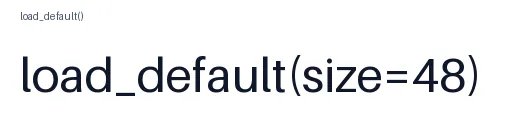
load_default() (top) vs load_default(size=48) (bottom).from PIL import Image, ImageDraw, ImageFont
img = Image.new("RGB", (520, 130), "white")
draw = ImageDraw.Draw(img)
draw.text((20, 10), "load_default()", font=ImageFont.load_default(), fill="#475467")
draw.text((20, 45), "load_default(size=48)", font=ImageFont.load_default(size=48), fill="#0f172a")
img.save("default_font.png")Find the font files you actually have
On Linux and macOS with fontconfig, fc-list : family file prints every installed font and its path. This
script does the same in pure Python, case-insensitively, in the folders Pillow uses:
import os
import sys
from pathlib import Path


def font_dirs():
    """The folders Pillow searches, plus a few common extras."""
    if sys.platform == "win32":
        dirs = [Path(os.environ.get("WINDIR", r"C:\Windows")) / "Fonts",
                Path(os.environ.get("LOCALAPPDATA", "")) / "Microsoft" / "Windows" / "Fonts"]
    elif sys.platform == "darwin":
        dirs = [Path("/Library/Fonts"), Path("/System/Library/Fonts"), Path.home() / "Library" / "Fonts"]
    else:
        data_home = os.environ.get("XDG_DATA_HOME") or Path.home() / ".local" / "share"
        data_dirs = os.environ.get("XDG_DATA_DIRS") or "/usr/local/share:/usr/share"
        dirs = [Path(data_home) / "fonts", *(Path(d) / "fonts" for d in data_dirs.split(":")), Path.home() / ".fonts"]
    return [d for d in dirs if d.is_dir()]


def find_fonts(word):
    """Case-insensitive search for font files whose name contains `word`."""
    word = word.lower()
    for d in font_dirs():
        for path in d.rglob("*"):
            if path.suffix.lower() in {".ttf", ".otf", ".ttc"} and word in path.name.lower():
                yield path


for path in sorted(find_fonts("dejavusans-b"))[:5]:
print(path)/usr/share/fonts/truetype/dejavu/DejaVuSans-Bold.ttfDocker and servers
Slim images such as python:3.13-slim ship with no fonts. Either copy your font into the image, or install a
package and use its path:
RUN apt-get update \
 && apt-get install -y --no-install-recommends fonts-dejavu-core \
 && rm -rf /var/lib/apt/lists/*
# then: ImageFont.truetype("/usr/share/fonts/truetype/dejavu/DejaVuSans.ttf", 40)
Similar errors
OSError: unknown file format / broken file
The file exists but is not a font FreeType can read. We fed it the three usual culprits:
import io
import zipfile
from PIL import ImageFont

real = open("/usr/share/fonts/truetype/dejavu/DejaVuSans.ttf", "rb").read()
zipped = io.BytesIO()
with zipfile.ZipFile(zipped, "w") as z:
    z.writestr("Roboto-Regular.ttf", real)

bad_files = {
    "HTML page saved as .ttf": b"<!doctype html><title>Google Fonts</title>",
    "zip archive renamed to .ttf": zipped.getvalue(),
    "truncated download": real[:5000],
}
for label, data in bad_files.items():
    open("Roboto-Regular.ttf", "wb").write(data)
    try:
        ImageFont.truetype("Roboto-Regular.ttf", 40)
    except OSError as e:
print(f"{label:<28} OSError: {e}")HTML page saved as .ttf OSError: broken file
zip archive renamed to .ttf OSError: unknown file format
truncated download OSError: unknown file formatOpen the file in a text editor: if you see HTML, download it again from the font's real file URL.
.ttc files and the index argument
A .ttc file bundles several fonts. Without index you get the first one. Pick another with the
index argument (an out-of-range index raises OSError too):
from PIL import ImageFont

path = "/usr/share/fonts/truetype/wqy/wqy-zenhei.ttc"    # a TrueType collection
for index in range(2):
print(index, ImageFont.truetype(path, 32, index=index).getname())0 ('WenQuanYi Zen Hei', 'Regular')
1 ('WenQuanYi Zen Hei Mono', 'Regular')Related
The outputs and images on this page are the real results of running every example with Pillow 12.3.0 on Python 3.13 (Linux) on 2026-10-15. Every example is also re-run automatically on macOS (Darwin 25.6.0, Pillow 12.3.0), Linux (Linux 6.17.0-1022-azure, Pillow 12.3.0), Windows (Windows 2025Server, Pillow 12.3.0); the line under each example shows the result per operating system. The DejaVu Sans font files sit next to each script so font examples behave the same everywhere. Sample photos: NASA/Sam Lott, public domain. Spotted something wrong? Tell us.