Image Module
Independent quick-reference. Canonical source: official Image module documentation.
PIL.Image is the module you use in almost every Pillow script. It contains the Image class (one object per picture) and the functions that create those objects: Image.open() for files, Image.new() for blank canvases, and Image.fromarray() / Image.frombytes() for pixel data you already have in memory.
Image.open(), BytesIO & Lazy Loading
Opens an image from a path or a binary file object. Opening is cheap: Pillow reads only the header (format, size, mode) and decodes the pixels later, the first time you use them or call load(). That makes it fast to check the dimensions of thousands of files, but it also means the file stays open until the pixels are loaded or you close it, so prefer with Image.open(path) as img: in loops. If the content is not a format Pillow recognises, it raises UnidentifiedImageError.
| Parameter | Type | Description |
|---|---|---|
fp | str | Path | file-like | A filename (string), pathlib.Path object, or an object implementing read(), seek(), tell(). |
mode | str | The mode. If given, this argument must be "r" (the only option). |
formats | list | None | If given, only these formats will be attempted. Accepts a sequence of format identifiers. |
Image.new()
Makes a blank image of a given mode and size, filled with a colour (black by default). Use it for canvases, masks and backgrounds.
| Parameter | Type | Description |
|---|---|---|
mode | str | The mode to use for the new image (e.g., "RGB", "RGBA", "L"). |
size | tuple[int,int] | Image size as a (width, height) tuple. |
color | int | tuple | str | Fill colour. Default: 0. Can be a named colour like "red", a tuple (255,0,0), or an integer for single-band modes. |
Image.frombytes()
Builds an image from raw bytes when you already know the mode and size, for example frames from a camera SDK or a hardware device. The bytes must be exactly width × height × bytes-per-pixel long.
| Parameter | Type | Description |
|---|---|---|
mode | str | Image mode. |
size | tuple | (width, height). |
data | bytes | Raw pixel data. |
decoder_name | str | Decoder to use. Default: "raw". |
*args | — | Arguments passed to the decoder. |
Image.fromarray()
Creates an image from a numpy array. This is the primary bridge between Pillow and the scientific Python ecosystem.
Instance Methods
convert()
Returns a copy of the image in another mode, such as "L" for greyscale, "RGB" to drop transparency, or "RGBA" to add an alpha channel. Converting a palette ("P") image looks each pixel up in its palette. Note that converting RGBA to RGB discards alpha rather than blending it; to put transparent images on a background, see flattening transparency.
| Parameter | Type | Description |
|---|---|---|
mode | str | The requested mode. See Modes reference. |
matrix | tuple | Optional 4- or 12-tuple for RGB ↔ RGB or RGB ↔ CMYK conversion matrix. |
dither | Dither | Dithering method. NONE or FLOYDSTEINBERG |
palette | Palette | Palette to use for P conversions. WEB or ADAPTIVE. |
colors | int | Number of colors for ADAPTIVE palette. Default: 256. |
save()
Writes the image to a path or file object. With a path, Pillow picks the format from the extension; with a file object, pass format=. Any extra keyword arguments (quality, optimize, exif, save_all and so on) go to that format's writer, so the options differ per format. Metadata such as EXIF is not copied unless you pass it.
| Parameter | Type | Description |
|---|---|---|
fp | str | Path | file-like | Path or file object to save to. |
format | str | None | Optional format override (e.g., "JPEG", "PNG"). |
**params | — | Format-specific parameters. See Image Format docs. |
Transforms: resize(), resampling & thumbnail()
resize() returns a new image and defaults to BICUBIC resampling; pass Image.Resampling.LANCZOS for the highest-quality downscale. thumbnail() resizes in place and always preserves the aspect ratio, so it never upscales — a common alternative to resize() when you only want to cap dimensions. transform() defaults to NEAREST unless you pass resample.
| Method | Signature | Returns |
|---|---|---|
resize() | resize(size, resample=BICUBIC, box=None, reducing_gap=None) | Image |
thumbnail() | thumbnail(size, resample=BICUBIC, reducing_gap=2.0) | None (in-place) |
crop() | crop(box=None) | Image |
rotate() | rotate(angle, resample=NEAREST, expand=False, center=None, translate=None, fillcolor=None) | Image |
transpose() | transpose(method) | Image |
transform() | transform(size, method, data=None, resample=NEAREST, fill=1, fillcolor=None) | Image |
reduce() | reduce(factor, box=None) | Image |
Compositing
| Method | Description |
|---|---|
im.paste(im2, box=None, mask=None) | Paste im2 into image at box. If mask is given, update only the region indicated by the mask. |
im.alpha_composite(im2, dest=(0,0), source=(0,0)) | Composite im2 over this image in-place. Both must be RGBA. |
Image.alpha_composite(im1, im2) | Static version. Returns new composited image. |
Image.blend(im1, im2, alpha) | Return new image as: im1 * (1 - alpha) + im2 * alpha. |
Image.composite(image1, image2, mask) | Create composite using mask. Same as paste() but returns new image. |
Pixel Access
| Method | Description |
|---|---|
im.load() | Allocates storage and returns a PixelAccess object for fast pixel read/write. Preferred for bulk operations. |
im.getpixel(xy) | Returns the pixel value at the given position. For RGB images, returns a tuple (R, G, B). |
im.putpixel(xy, value) | Sets pixel value at position. Very slow in a loop — use load() instead. |
im.histogram() | Returns a list of pixel counts per level. Length = 256 for L mode, 768 for RGB. |
im.getcolors(maxcolors=256) | Returns a list of (count, color) tuples. Returns None if there are more colors than maxcolors. |
putpalette() & 8-Bit Palettes
Attaches a raw palette to an 8-bit image (mode "P" or "L"). The palette sequence must contain 768 integer values (256 RGB triplets: [R0, G0, B0, R1, G1, B1, ...]) or 1024 values for RGBA.
draft() & Fast Decoding
Configures the file reader to load a downscaled version of the image directly from the native C decoder (currently supported for JPEG and MPO). This avoids allocating full-size RAM buffers, delivering up to 5×–10× faster load times for thumbnails.
Constants & Enums
| Constant | Values |
|---|---|
Image.Resampling | NEAREST, BOX, BILINEAR, HAMMING, BICUBIC, LANCZOS |
Image.Transpose | FLIP_LEFT_RIGHT, FLIP_TOP_BOTTOM, ROTATE_90, ROTATE_180, ROTATE_270, TRANSPOSE, TRANSVERSE |
Image.Transform | AFFINE, EXTENT, PERSPECTIVE, QUAD, MESH |
Image.Dither | NONE, FLOYDSTEINBERG, ORDERED, RASTERIZE |
Image.Palette | WEB, ADAPTIVE |
Image.MAX_IMAGE_PIXELS | Default: 178_956_970. Set to None to disable decompression bomb protection. |
Tested examples
Everything in this section was run with Pillow 12.3.0 on Python 3.13; outputs and images are real. Sample photos: NASA/Sam Lott, public domain.
open() is lazy: see it
Opening only reads the header. Decoding happens on first use. On a 6000×4000 JPEG:
import time
from PIL import Image

Image.open("photo.jpg").resize((6000, 4000)).save("big.jpg", quality=90)

t = time.perf_counter()
img = Image.open("big.jpg")
print(f"open():  {(time.perf_counter() - t) * 1000:6.1f} ms  ->", img.format, img.size, img.mode)

t = time.perf_counter()
img.load()
print(f"load(): {(time.perf_counter() - t) * 1000:6.1f} ms (pixels decoded now)")open(): 0.2 ms -> JPEG (6000, 4000) RGB
load(): 119.9 ms (pixels decoded now)So reading the size of thousands of images is fast, as long as you do not touch the pixels.
NumPy arrays: the dtype must be right
Image.fromarray() picks the mode from the array's shape and dtype. Colour images need uint8; a float
array (the default from most maths) fails:
import numpy as np
from PIL import Image

arr = np.random.rand(100, 100, 3)          # float64 values in 0..1
Image.fromarray(arr)TypeError: Cannot handle this data type: (1, 1, 3), <f8import numpy as np
from PIL import Image
arr = np.random.default_rng(0).random((100, 100, 3)) # float64, 0..1
img = Image.fromarray((arr * 255).round().astype(np.uint8))
print(img.mode, img.size)
back = np.asarray(img)
print(back.shape, back.dtype) # (height, width, channels)RGB (100, 100)
(100, 100, 3) uint8Note the axis order: NumPy arrays are (height, width, channels), while Pillow sizes are (width, height).
crop(): exclusive edges and out-of-bounds boxes
from PIL import Image

img = Image.open("photo.jpg")                 # 1600 x 1067
box = (100, 50, 500, 350)                     # (left, upper, right, lower)
print(img.crop(box).size)                     # right and lower are exclusive: 400 x 300

edge = img.crop((1500, 1000, 1700, 1100))     # partly outside the image
print(edge.size, edge.getpixel((199, 99))) # outside area is filled with black(400, 300)
(200, 100) (0, 0, 0)rotate(): expand and fillcolor
Angles are in degrees, counter-clockwise. Without expand=True the corners are cut off:
from PIL import Image

img = Image.open("photo.jpg").resize((400, 267))
a = img.rotate(20)                                        # same size, corners cut off
b = img.rotate(20, expand=True, fillcolor="white")        # canvas grows to fit
print(a.size, b.size)

sheet = Image.new("RGB", (a.width + b.width + 20, b.height), "white")
sheet.paste(a, (0, (b.height - a.height) // 2))
sheet.paste(b, (a.width + 20, 0))
sheet.save("rotate.png")(400, 267) (468, 389)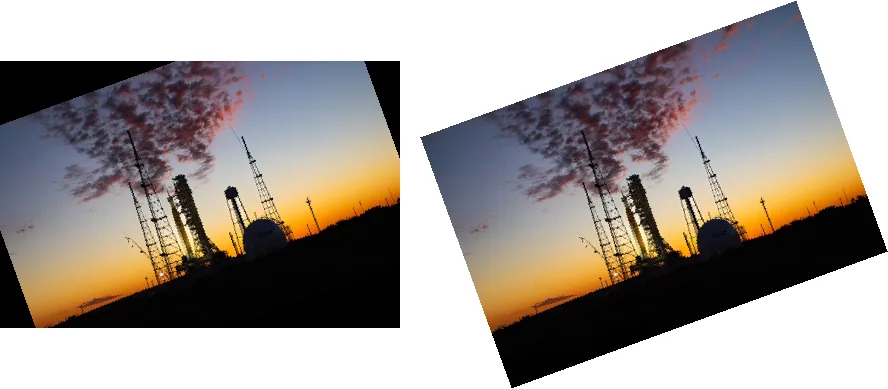
For phone photos that appear sideways, do not rotate by hand: use ImageOps.exif_transpose() (see
why).
convert(): what each mode looks like

from PIL import Image, ImageDraw, ImageFont

src = Image.open("photo.jpg").resize((320, 213))
variants = {
    '"L"': src.convert("L"),
    '"1" (dithered)': src.convert("1"),
    '"1", dither=NONE': src.convert("1", dither=Image.Dither.NONE),
    '"P", 8 colours': src.convert("P", palette=Image.Palette.ADAPTIVE, colors=8),
}
font = ImageFont.load_default(size=18)
sheet = Image.new("RGB", (4 * 330, 250), "white")
for i, (label, im) in enumerate(variants.items()):
    sheet.paste(im.convert("RGB"), (i * 330, 0))
    ImageDraw.Draw(sheet).text((i * 330 + 160, 225), label, font=font, fill="black", anchor="mm")
sheet.save("modes.png")convert("1") dithers by default (Floyd–Steinberg). For a hard threshold, pass
dither=Image.Dither.NONE or use img.point(lambda v: 255 if v > 128 else 0, mode="1"); the
threshold tool lets you compare methods interactively.
Reading pixels: getpixel() vs load() vs NumPy
Summing every pixel of a 1600×1067 greyscale image three ways (Pillow 12.3.0, 4-vCPU Linux VM):
import time
import numpy as np
from PIL import Image

img = Image.open("photo.jpg").convert("L")     # 1600 x 1067 = 1.7 million pixels


def timed(label, fn):
    t = time.perf_counter(); result = fn(); print(f"{label:<22} {(time.perf_counter() - t) * 1000:8.1f} ms"); return result


def with_getpixel():
    return sum(img.getpixel((x, y)) for y in range(img.height) for x in range(img.width))

def with_load():
    px = img.load()
    return sum(px[x, y] for y in range(img.height) for x in range(img.width))

def with_numpy():
    return int(np.asarray(img, dtype=np.int64).sum())

a = timed("getpixel()", with_getpixel)
b = timed("load() pixel access", with_load)
c = timed("numpy", with_numpy)
print("same result:", a == b == c)getpixel() 737.0 ms
load() pixel access 92.0 ms
numpy 64.2 ms
same result: Truegetpixel() pays a method call per pixel and was about 8× slower than the pixel-access object
from load(). NumPy was the fastest, and the gap grows for real per-pixel maths, where NumPy works on the whole array
at once instead of looping in Python. For bulk work, convert to an array or use a built-in Pillow operation.