Pillow Secondary Modules (ImageEnhance, ImageFont, ImageChops…)
Independent quick-reference. Canonical source: official ImageEnhance module documentation.
ImageEnhance adjusts brightness, contrast, colour saturation and sharpness. All four classes work the same way: wrap the image (ImageEnhance.Contrast(img)), then call .enhance(factor). A factor of 1.0 leaves the image unchanged, values below 1 reduce the effect (0 gives a black, grey, greyscale or blurred result respectively) and values above 1 increase it.
| Class | Factor = 0 | Factor = 1.0 | Factor = 2.0+ |
|---|---|---|---|
ImageEnhance.Contrast(image) | Solid gray image | Original | Higher contrast |
ImageEnhance.Brightness(image) | Black image | Original | Brighter |
ImageEnhance.Color(image) | Grayscale | Original | More vibrant colour |
ImageEnhance.Sharpness(image) | Blurred | Original | Sharpened |
ImageFont Module
ImageFont loads the fonts that ImageDraw.text() uses. In practice that means ImageFont.truetype(path, size) for TrueType and OpenType files, or ImageFont.load_default(size=...) for the font built into Pillow (scalable since 10.1). If truetype() cannot find the file you get OSError: cannot open resource.
| Function | Description |
|---|---|
ImageFont.truetype(font, size, index=0, encoding="") | Load a TrueType or OpenType font from a file path or URL. Returns an FreeTypeFont object. |
ImageFont.load(filename) | Load a BDF or PCF bitmap font. Limited to ASCII characters. |
ImageFont.load_default(size=None) | Load Pillow's built-in font. Since Pillow 10.1 this is a scalable TrueType font (Aileron); without size it is only 10 px, so pass size= for readable text. Builds without FreeType fall back to a small bitmap font. Tested details. |
FreeTypeFont.getbbox(text) | Returns (left, top, right, bottom) bounding box of the text. |
FreeTypeFont.getlength(text) | Returns the rendered length of the text in pixels. |
FreeTypeFont.getmetrics() | Returns (ascent, descent). |
FreeTypeFont.font_variant(size, index, encoding, font_path) | Create a new FreeTypeFont at a different size, useful for caching font objects. |
ImageGrab Module
ImageGrab takes screenshots (grab()) and reads images from the clipboard (grabclipboard()) into Pillow images. Supported on Windows, macOS and Linux. On Linux, Pillow uses its built-in XCB support (no extra Python package needed); if that fails, for example on Wayland, it falls back to gnome-screenshot, grim or spectacle. Clipboard access on Linux needs wl-paste or xclip.
| Function | Description |
|---|---|
ImageGrab.grab(bbox=None, include_layered_windows=False, all_screens=False, xdisplay=None) | Take a screenshot. bbox is (left, upper, right, lower) to capture region. Default is full screen. |
ImageGrab.grabclipboard() | Grab the current contents of the clipboard as an image. Returns None if clipboard contains non-image data. |
ImageChops Module (Channel Operations)
ImageChops ("channel operations") combines two images pixel by pixel: difference, add, subtract, multiply, screen, lighter, darker and more. Both images usually need the same size and mode. The classic use is ImageChops.difference(a, b) to find what changed between two screenshots.
| Function | Formula | Description |
|---|---|---|
add(image1, image2, scale=1.0, offset=0) | (im1 + im2) / scale + offset | Add two images. Clip to 0–255. |
subtract(image1, image2, scale=1.0, offset=0) | (im1 - im2) / scale + offset | Subtract two images. |
multiply(image1, image2) | im1 * im2 / MAX | Multiply two images. Making darker. |
screen(image1, image2) | MAX - (MAX-im1)*(MAX-im2)/MAX | Screen blend. Opposite of multiply — making lighter. |
difference(image1, image2) | |im1 - im2| | Absolute difference. Useful for detecting changes between frames. |
add_modulo(image1, image2) | (im1 + im2) % MAX | Add modulo MAX (wraps around, no clipping). |
subtract_modulo(image1, image2) | (im1 - im2) % MAX | Subtract modulo MAX. |
invert(image) | MAX - im | Invert the image. |
lighter(image1, image2) | max(im1, im2) | Return brighter pixels from both images. |
darker(image1, image2) | min(im1, im2) | Return darker pixels from both images. |
logical_and(image1, image2) | AND | Logical AND on pixel data. |
logical_or(image1, image2) | OR | Logical OR on pixel data. |
logical_xor(image1, image2) | XOR | Logical XOR on pixel data. |
constant(image, value) | — | Return a copy filled with the given pixel value. |
duplicate(image) | — | Return a copy of the image. |
offset(image, xoffset, yoffset=None) | — | Return a copy with pixels shifted by offset. Wraps around. |
composite(image1, image2, mask) | — | Composite two images using a mask. |
hard_light(image1, image2) | — | Hard light blend. Strong contrast effect. |
soft_light(image1, image2) | — | Soft light blend. Subtle lightening/darkening. |
overlay(image1, image2) | — | Overlay blend mode. Multiply for darks, screen for lights. |
ImageStat Module
ImageStat.Stat(img) computes summary numbers for an image (or for the area under a mask): mean, median, standard deviation, extremes and more. Each attribute is a list with one value per band, so an RGB image gives three numbers. Useful for detecting blank or over-exposed images in a pipeline.
| Attribute | Type | Description |
|---|---|---|
stat.extrema | list of (min, max) tuples | Min and max value per band. |
stat.count | list of int | Number of pixels per band. |
stat.sum | list of float | Sum of all pixel values per band. |
stat.sum2 | list of float | Sum of squares per band. |
stat.mean | list of float | Average pixel value per band. |
stat.median | list of float | Median pixel value per band. |
stat.rms | list of float | Root mean square per band. |
stat.var | list of float | Variance per band. |
stat.stddev | list of float | Standard deviation per band. |
ImageMath Module
ImageMath evaluates arithmetic expressions over whole images, for example combining bands with a formula. The module provides two evaluation functions — choose based on whether you trust the input expressions.
| Function | Description |
|---|---|
ImageMath.lambda_eval(expression, environment={}) | Evaluate expression using a lambda. Safe for untrusted input. Expression is a callable taking band values. |
ImageMath.unsafe_eval(expression, **environment) | Evaluate expression string. Only use with trusted input. Supports operators: +, -, *, /, **, &, |, ^, ~, and functions like min(), max(), abs(), float(), int(). |
A tested example with real output is in the ImageMath section below: note that lambda_eval() takes the images as keyword arguments, and that integer images need convert() or float() before multiplying by a fraction.
ImageSequence Module
ImageSequence.Iterator(img) loops over the frames of an animated GIF, WebP or APNG, or the pages of a multi-page TIFF. Each frame is the same image object moved to the next position, so call frame.copy() if you want to keep frames.
ImageColor Module
The ImageColor module converts CSS3-style colour definitions to RGB tuples for use in Pillow drawing functions.
| Function | Description |
|---|---|
ImageColor.getrgb(color) | Convert a colour string to an RGB or RGBA tuple. Supports named colours, hex (#rgb, #rrggbb, #aarrggbb), rgb(), rgba(), hsl(), hsla(). |
ImageColor.getcolor(color, mode) | Same as getrgb() but converts to the given image mode. Useful for passing to Image.new(). |
Tested examples
Everything in this section was run with Pillow 12.3.0; images and numbers are the real output. Sample photos: NASA/Sam Lott, public domain.
ImageEnhance factors, side by side
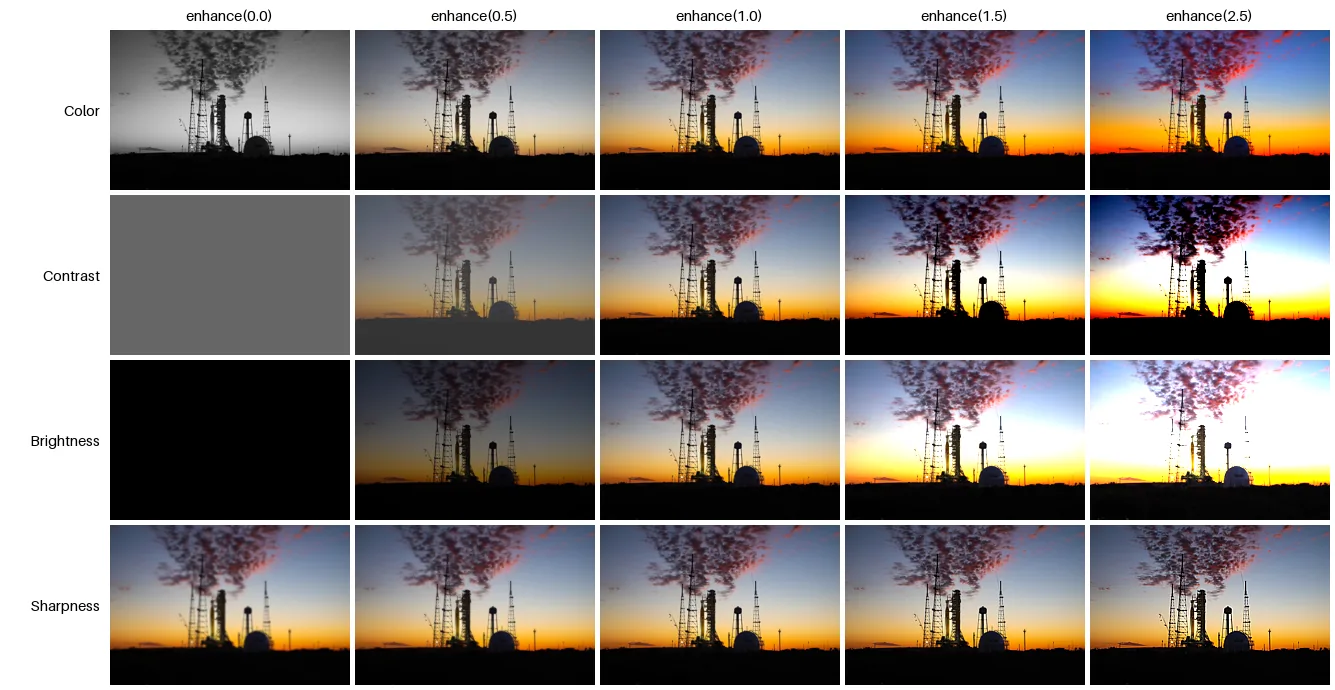
from PIL import Image, ImageDraw, ImageEnhance

src = Image.open("photo.jpg").resize((240, 160))
enhancers = ["Color", "Contrast", "Brightness", "Sharpness"]
factors = [0.0, 0.5, 1.0, 1.5, 2.5]

sheet = Image.new("RGB", (110 + len(factors) * 245, 30 + len(enhancers) * 165), "white")
draw = ImageDraw.Draw(sheet)
for j, f in enumerate(factors):
    draw.text((110 + j * 245 + 120, 15), f"enhance({f})", fill="black", anchor="mm", font_size=15)
for i, name in enumerate(enhancers):
    draw.text((100, 30 + i * 165 + 80), name, fill="black", anchor="rm", font_size=15)
    enhancer = getattr(ImageEnhance, name)(src)
    for j, f in enumerate(factors):
        sheet.paste(enhancer.enhance(f), (110 + j * 245, 30 + i * 165))
sheet.save("enhance.png")Each enhancer blends between a "degenerate" image and the original: factor 0 gives greyscale for Color, flat
grey for Contrast, black for Brightness and a blurred image for Sharpness. Factors above
1 extrapolate beyond the original, which is why 2.5 clips highlights.
Are two images identical? ImageChops.difference
from PIL import Image, ImageChops

a = Image.open("photo.jpg")
b = a.copy()
b.paste((255, 0, 0), (700, 500, 720, 520))                      # change a 20x20 square

diff = ImageChops.difference(a, b)
print("identical?", diff.getbbox() is None)
print("changed region:", diff.getbbox())

resaved = Image.open("photo.jpg")
resaved.save("again.jpg", quality=92)
diff2 = ImageChops.difference(a, Image.open("again.jpg"))
print("re-saved JPEG identical?", diff2.getbbox() is None, " largest channel difference:", max(hi for lo, hi in diff2.getextrema()))identical? False
changed region: (700, 500, 720, 520)
re-saved JPEG identical? False largest channel difference: 27getbbox() of the difference is None only when every pixel matches, and otherwise gives the box
that contains every change. Re-saving a JPEG changes pixels slightly even at the same quality, so compare decoded pixels with a
tolerance, or compare files only when they are lossless.
Brightness and contrast with ImageStat
from PIL import Image, ImageStat

for name in ["photo.jpg", "portrait.jpg"]:
    img = Image.open(name)
    st = ImageStat.Stat(img)
    r, g, b = (round(v) for v in st.mean)
    luma = ImageStat.Stat(img.convert("L"))
print(f"{name:<13} mean RGB ({r}, {g}, {b}) brightness {luma.mean[0]:5.1f}/255 contrast (stddev) {luma.stddev[0]:4.1f}")photo.jpg mean RGB (111, 99, 92) brightness 102.0/255 contrast (stddev) 72.5
portrait.jpg mean RGB (25, 65, 101) brightness 57.2/255 contrast (stddev) 39.2mean, median, stddev, extrema and the rest are computed per band.
The mean of the greyscale version is a simple brightness measure, and its standard deviation a simple contrast measure,
handy for flagging under-exposed photos in a batch.
ImageMath on Pillow 12
from PIL import Image, ImageMath

img = Image.open("photo.jpg").convert("L")

# Safe evaluation: your function receives the images, plus helpers such as convert, min and max, in a dict
darker = ImageMath.lambda_eval(lambda args: args["convert"](args["a"] / 2, "L"), a=img)
print(darker.mode, img.getpixel((690, 600)), "->", darker.getpixel((690, 600)))

# Per-pixel maximum of three bands
r, g, b = Image.open("photo.jpg").split()
brightest = ImageMath.lambda_eval(
    lambda args: args["convert"](args["max"](args["max"](args["r"], args["g"]), args["b"]), "L"),
    r=r, g=g, b=b)
print(brightest.mode, brightest.getpixel((690, 600)))

# The same idea as a string: only for trusted input, never text from users
print(ImageMath.unsafe_eval("convert(a / 2, 'L')", a=img).getpixel((690, 600)))

try:
    ImageMath.lambda_eval(lambda args: args["a"] * 0.5, a=img)     # int image times a fraction
except TypeError as e:
print("TypeError:", e)L 57 -> 28
L 79
28
TypeError: color must be int or single-element tupleImageMath.eval() was removed in Pillow 12; use lambda_eval() (safe) or unsafe_eval()
(a string expression, for trusted input only). Images and values are passed as keyword arguments. Integer images cannot be
multiplied by a fraction directly, as the last line shows; divide, or convert with float() first.
Colour strings: ImageColor
from PIL import ImageColor

for spec in ["red", "rebeccapurple", "#2563eb", "#2563eb80", "rgb(37, 99, 235)", "hsl(210, 80%, 50%)"]:
    print(f"{spec:<20} getrgb -> {ImageColor.getrgb(spec)}")
print("getcolor('#2563eb80', 'RGBA') ->", ImageColor.getcolor("#2563eb80", "RGBA"))
print("getcolor('#2563eb', 'L') ->", ImageColor.getcolor("#2563eb", "L"))red getrgb -> (255, 0, 0)
rebeccapurple getrgb -> (102, 51, 153)
#2563eb getrgb -> (37, 99, 235)
#2563eb80 getrgb -> (37, 99, 235, 128)
rgb(37, 99, 235) getrgb -> (37, 99, 235)
hsl(210, 80%, 50%) getrgb -> (25, 127, 230)
getcolor('#2563eb80', 'RGBA') -> (37, 99, 235, 128)
getcolor('#2563eb', 'L') -> 96Every Pillow function that takes a colour accepts these strings, so fill="#2563eb80" works as well as a tuple.
getcolor() converts to the mode you are drawing on.