Check with img.mode. The common ones: RGB (colour photos), RGBA (colour with
transparency), L (greyscale), P (palette: up to 256 colours, like GIFs), 1 (black and
white). Count channels with len(img.getbands()). Convert with img.convert(mode), watching for
the cases below that throw information away.
Every mode at a glance
Generated by Pillow itself, so the table matches the version you are reading about:
from PIL import Image

print(f"{'mode':<6} {'bands':<14} {'getpixel returns':<26} NumPy dtype")
for mode in ["1", "L", "LA", "P", "RGB", "RGBA", "CMYK", "YCbCr", "LAB", "HSV", "I", "I;16", "F"]:
    img = Image.new(mode, (2, 2))
    px = img.getpixel((0, 0))
    try:
        import numpy as np
        dtype = str(np.asarray(img).dtype)
    except Exception as e:
        dtype = type(e).__name__
print(f"{mode:<6} {','.join(img.getbands()):<14} {type(px).__name__ + ' ' + repr(px):<26} {dtype}")mode bands getpixel returns NumPy dtype
1 1 int 0 bool
L L int 0 uint8
LA L,A tuple (0, 0) uint8
P P int 0 uint8
RGB R,G,B tuple (0, 0, 0) uint8
RGBA R,G,B,A tuple (0, 0, 0, 0) uint8
CMYK C,M,Y,K tuple (0, 0, 0, 0) uint8
YCbCr Y,Cb,Cr tuple (0, 0, 0) uint8
LAB L,A,B tuple (0, 0, 0) uint8
HSV H,S,V tuple (0, 0, 0) uint8
I I int 0 int32
I;16 I int 0 uint16
F F float 0.0 float32Notes on the less obvious ones:
- 1: one bit per pixel, black or white. Stored as 0 or 255 in
getpixel()and asboolin NumPy. - P: each pixel is an index into a palette of up to 256 RGB colours, which is why
getpixel()returns one number. - I and F: 32-bit integer and 32-bit float, single channel. They come from scientific
data, depth maps and
Image.fromarray()on such arrays. Most formats cannot save them directly. - I;16: 16-bit greyscale, from 16-bit PNG and TIFF files, medical and astronomy images.
- CMYK: print colours. JPEGs from print workflows open in this mode.
- YCbCr, LAB, HSV: other colour models, used for processing. Converting
img.convert("HSV")andimg.convert("LAB")work directly on RGB images; for colour-managed work with ICC profiles, useImageCms.
Which mode will a file open as?
from PIL import Image

for name in ["photo.jpg", "photo.png", "logo.png", "spinner.gif", "rings.png"]:
    with Image.open(name) as img:
print(f"{name:<12} {img.format:<5} {img.mode}")photo.jpg JPEG RGB
photo.png PNG RGB
logo.png PNG RGBA
spinner.gif GIF P
rings.png PNG LThe mode depends on the file, not just the format: a PNG can be RGB, RGBA, P, L, LA, 1 or I;16. Code that assumes every PNG
is RGBA, or every image RGB, fails on the first file that is not. Normalise at the start: img = img.convert("RGB")
(or "RGBA" if you need transparency).
P vs L: palette vs greyscale
Both store one number per pixel, which is why they get confused. In L the number is the brightness. In
P it is an index into a palette, which can hold any colours:
from PIL import Image

photo = Image.open("photo.jpg").resize((400, 267))
p = photo.quantize(colors=16)                  # P: up to 256 colours, chosen for this image
l = photo.convert("L")                         # L: 256 shades of grey

x, y = 330, 170                                # orange sky near the horizon
print("P pixel:", p.getpixel((x, y)), " palette entry:", tuple(p.getpalette()[p.getpixel((x, y)) * 3:][:3]))
print("L pixel:", l.getpixel((x, y)))
print("colours used: P", len(p.getcolors()), " L", len(l.getcolors()))

sheet = Image.new("RGB", (810, 267), "white")
sheet.paste(p.convert("RGB"), (0, 0))
sheet.paste(l.convert("RGB"), (410, 0))
sheet.save("p_vs_l.png")P pixel: 2 palette entry: (216, 178, 112)
L pixel: 206
colours used: P 16 L 248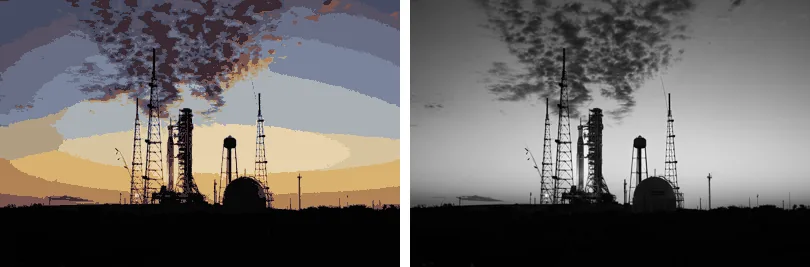
Arithmetic on P pixels (averaging, thresholding, resizing with smoothing) is meaningless, because neighbouring
indexes can be completely different colours. Pillow handles this for its own operations, but if you process the numbers
yourself, convert to RGB or L first.
How many channels does an image have?
from PIL import Image

for name in ["photo.jpg", "logo.png", "spinner.gif"]:
    img = Image.open(name)
    print(f"{name:<12} mode {img.mode:<5} channels: {len(img.getbands())}  {img.getbands()}")
print("RGBA has", Image.getmodebands("RGBA"), "bands") # without opening an imagephoto.jpg mode RGB channels: 3 ('R', 'G', 'B')
logo.png mode RGBA channels: 4 ('R', 'G', 'B', 'A')
spinner.gif mode P channels: 1 ('P',)
RGBA has 4 bandsConversions that lose information
RGBA to RGB drops the alpha channel. Transparent pixels show whatever colour they happen to store, often black:
from PIL import Image

logo = Image.open("logo.png")                                   # RGBA, transparent corners
naive = logo.convert("RGB")
print("convert('RGB') corner:", naive.getpixel((5, 5)))           # alpha dropped: stored colour shows

flat = Image.new("RGB", logo.size, "white")
flat.paste(logo, mask=logo.getchannel("A"))
print("flattened on white: ", flat.getpixel((5, 5)))convert('RGB') corner: (0, 0, 0)
flattened on white: (255, 255, 255)Composite onto a background instead, as above. The RGBA to JPEG tool covers this in detail.
P with transparency to RGB has the same problem, with the twist that transparency is not a channel but an
entry in img.info:
from PIL import Image

# A palette image with one transparent palette entry, as GIFs and small PNGs often have
img = Image.new("P", (4, 1))
img.putpalette([255, 0, 0, 0, 255, 0] + [0] * 762)              # entry 0 red, entry 1 green
img.putdata([0, 1, 0, 1])
img.info["transparency"] = 0                                    # entry 0 is see-through
img.save("tiny.png")

reopened = Image.open("tiny.png")
print("mode", reopened.mode, "transparency", reopened.info.get("transparency"))
print("to RGB: ", reopened.convert("RGB").getpixel((0, 0)))     # transparency ignored: solid red
print("to RGBA:", reopened.convert("RGBA").getpixel((0, 0))) # alpha 0: really transparentmode P transparency 0
to RGB: (255, 0, 0)
to RGBA: (255, 0, 0, 0)Go through RGBA whenever a palette image may be transparent. Other lossy conversions: anything to
1 (see black and white), I;16/I/F to
L, which clips instead of scaling (see cannot write mode), and
CMYK to RGB without a colour profile.
Related
The outputs and images on this page are the real results of running every example with Pillow 12.3.0 on Python 3.13 (Linux) on 2026-10-15. Every example is also re-run automatically on macOS (Darwin 25.6.0, Pillow 12.3.0), Linux (Linux 6.17.0-1022-azure, Pillow 12.3.0), Windows (Windows 2025Server, Pillow 12.3.0); the line under each example shows the result per operating system. The DejaVu Sans font files sit next to each script so font examples behave the same everywhere. Sample photos: NASA/Sam Lott, public domain. Spotted something wrong? Tell us.