img.rotate(angle, expand=True, resample=Image.BICUBIC, fillcolor="white"). Angles are counter-clockwise, so
use a negative angle to turn clockwise. For 90/180/270 degrees and mirroring, use
img.transpose(Image.Transpose.ROTATE_270) and friends: exact and lossless. For phone photos that appear
sideways, use ImageOps.exif_transpose(img).
Which way does rotate() turn?
import numpy as np
from PIL import Image

marker = Image.new("L", (3, 2), 0)
marker.putpixel((0, 0), 255)                         # one white pixel in the top-left corner
print(np.asarray(marker), "\n")
print("rotate(90):", np.asarray(marker.rotate(90, expand=True)).tolist())    # top-left -> bottom-left
print("rotate(-90):", np.asarray(marker.rotate(-90, expand=True)).tolist()) # top-left -> top-right[[255 0 0]
[ 0 0 0]]
rotate(90): [[0, 0], [0, 0], [255, 0]]
rotate(-90): [[0, 255], [0, 0], [0, 0]]Counter-clockwise, as in maths. rotate(90) moves the top-left corner to the bottom-left; to turn clockwise by
90 degrees use rotate(-90, expand=True) or transpose(Image.Transpose.ROTATE_270).
Keep the whole image: expand=True
from PIL import Image

img = Image.open("photo.jpg").resize((480, 320))
cropped = img.rotate(30)                                         # same size: corners cut off, black fill
whole = img.rotate(30, expand=True, fillcolor="white")           # canvas grows to fit
smooth = img.rotate(30, expand=True, fillcolor="white", resample=Image.BICUBIC)
print("rotate(30):", cropped.size, "  expand=True:", whole.size)

sheet = Image.new("RGB", (cropped.width + whole.width + 20, whole.height), "white")
sheet.paste(cropped, (0, (whole.height - cropped.height) // 2))
sheet.paste(smooth, (cropped.width + 20, 0))
sheet.save("rotate30.png")rotate(30): (480, 320) expand=True: (576, 518)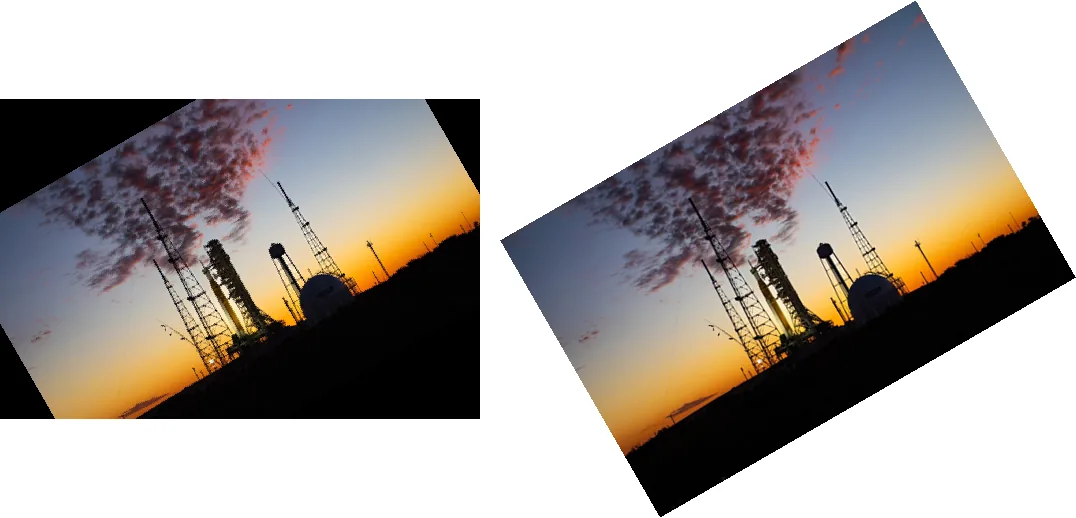
rotate(30). Right: rotate(30, expand=True, fillcolor="white", resample=BICUBIC).Without expand, the output has the input's size, so anything rotated outside the frame is lost and uncovered
areas are filled with black (transparent for RGBA images). fillcolor sets that colour. To rotate around a point
other than the centre, pass center=(x, y); it has no effect on the size.
Smooth edges: the resample argument
The default is NEAREST, which copies the closest pixel and leaves stair-stepped edges on anything that is not a
multiple of 90 degrees:
from PIL import Image

img = Image.open("photo.jpg")
crop = (1000, 380, 1100, 480)                             # the lattice tower on the right
tiles = []
for method in [Image.NEAREST, Image.BILINEAR, Image.BICUBIC]:
    r = img.rotate(12, resample=method, center=(1050, 430))
    tiles.append(r.crop(crop).resize((300, 300), Image.NEAREST))   # enlarged 3x to show pixels
sheet = Image.new("RGB", (920, 300), "white")
for i, t in enumerate(tiles):
    sheet.paste(t, (i * 310, 0))
sheet.save("resample.png")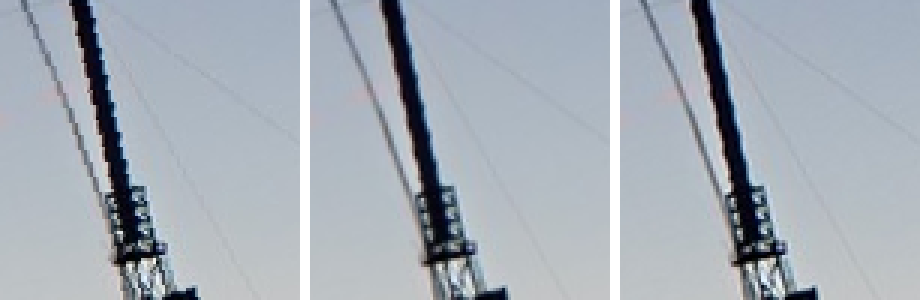
rotate() only accepts these three filters; LANCZOS raises an error. BICUBIC is the best
choice for photos.
90, 180, 270 degrees: exact and fast
import time
import numpy as np
from PIL import Image

img = Image.open("photo.jpg")
a = img.rotate(90, expand=True)
b = img.transpose(Image.Transpose.ROTATE_90)
print("identical:", np.array_equal(np.asarray(a), np.asarray(b)), a.size)

t = time.perf_counter(); img.rotate(89.9, expand=True); slow = time.perf_counter() - t
t = time.perf_counter(); img.rotate(90, expand=True); fast = time.perf_counter() - t
print(f"rotate(89.9): {slow * 1000:.0f} ms rotate(90): {fast * 1000:.1f} ms")identical: True (1067, 1600)
rotate(89.9): 9 ms rotate(90): 7.3 msFor multiples of 90 degrees, rotate(..., expand=True) uses the same exact pixel shuffle as
transpose(), with no resampling, so nothing is blurred. An angle just off 90 goes through full interpolation and is
much slower. Note that saving a rotated JPEG re-compresses it; for truly lossless JPEG rotation, a tool like
jpegtran rotates the compressed data directly.
Flip and mirror
from PIL import Image, ImageOps

img = Image.open("logo.png")
mirror = img.transpose(Image.Transpose.FLIP_LEFT_RIGHT)    # same as ImageOps.mirror(img)
upside = img.transpose(Image.Transpose.FLIP_TOP_BOTTOM)    # same as ImageOps.flip(img)
print("pixel (100, 180) moves to", (img.width - 1 - 100, 180), ":",
      img.getpixel((100, 180)) == mirror.getpixel((img.width - 1 - 100, 180)))
print([t.name for t in Image.Transpose])pixel (100, 180) moves to (499, 180) : True
['FLIP_LEFT_RIGHT', 'FLIP_TOP_BOTTOM', 'ROTATE_90', 'ROTATE_180', 'ROTATE_270', 'TRANSPOSE', 'TRANSVERSE']TRANSPOSE and TRANSVERSE flip across the diagonals (a rotation plus a mirror), which is what some
EXIF orientation values require.
Photos that appear sideways
Phone cameras often save the pixels sideways and add an EXIF tag saying how to display them. Browsers and photo apps obey the tag; Pillow gives you the stored pixels:
from PIL import Image, ImageOps

img = Image.open("phone.jpg")
print("stored:", img.size, " orientation tag:", img.getexif().get(0x0112))
upright = ImageOps.exif_transpose(img)
print("upright:", upright.size, " tag now:", upright.getexif().get(0x0112))stored: (1200, 800) orientation tag: 6
upright: (800, 1200) tag now: Noneexif_transpose() applies the tag and removes it, so the image cannot be rotated twice by a viewer later. Call it
right after opening, before resizing or cropping. More in reading EXIF data.
Related
The outputs and images on this page are the real results of running every example with Pillow 12.3.0 on Python 3.13 (Linux) on 2026-10-15. Every example is also re-run automatically on macOS (Darwin 25.6.0, Pillow 12.3.0), Linux (Linux 6.17.0-1022-azure, Pillow 12.3.0), Windows (Windows 2025Server, Pillow 12.3.0); the line under each example shows the result per operating system. The DejaVu Sans font files sit next to each script so font examples behave the same everywhere. Sample photos: NASA/Sam Lott, public domain. Spotted something wrong? Tell us.