Use Image.LANCZOS for shrinking photos, Image.BICUBIC when you want nearly the same quality a
little faster, and Image.NEAREST only for pixel art or masks whose exact values must not be blended.
Pillow 13 adds Image.MKS2013, which measured sharper than LANCZOS with about as little aliasing
and runs faster; it is not available on Pillow 12 or older.
Image.ANTIALIAS was the old name of LANCZOS and was removed in Pillow 10.
The eight filters and their names
from PIL import Image

for name in ["NEAREST", "BOX", "BILINEAR", "HAMMING", "BICUBIC", "LANCZOS", "MKS2013", "MKS2021"]:
    print(f"Image.{name:<9}= Image.Resampling.{name:<9}= {int(getattr(Image, name))}")
try:
    Image.new("RGB", (10, 10)).rotate(10, resample=Image.MKS2013)
except ValueError as e:
    print("rotate():", e)

img = Image.open("photo.jpg")
default = img.resize((400, 267)).tobytes()
same = [n for n in ["NEAREST", "BILINEAR", "BICUBIC", "LANCZOS"] if img.resize((400, 267), getattr(Image, n)).tobytes() == default]
print("resize() with no filter gives the same pixels as:", same)Image.NEAREST = Image.Resampling.NEAREST = 0
Image.BOX = Image.Resampling.BOX = 4
Image.BILINEAR = Image.Resampling.BILINEAR = 2
Image.HAMMING = Image.Resampling.HAMMING = 5
Image.BICUBIC = Image.Resampling.BICUBIC = 3
Image.LANCZOS = Image.Resampling.LANCZOS = 1
Image.MKS2013 = Image.Resampling.MKS2013 = 6
Image.MKS2021 = Image.Resampling.MKS2021 = 7
rotate(): Image.Resampling.MKS2013 (6) cannot be used. Use Image.Resampling.NEAREST (0), Image.Resampling.BILINEAR (2) or Image.Resampling.BICUBIC (3)
resize() with no filter gives the same pixels as: ['BICUBIC']The short names (Image.LANCZOS) and the enum (Image.Resampling.LANCZOS) are the same value. The enum
only exists in Pillow 9.1 and newer, which is why old installs raise
has no attribute 'Resampling'; the short names work on every version.
As the last line shows, resize() uses BICUBIC for photos when you pass no filter (for
1 and P images it uses NEAREST).
MKS2013 and MKS2021 are new in Pillow 13: John Costella's "Magic Kernel Sharp" filters, which build a
sharpening step into the kernel. They reach 2.5 and 4.5 source pixels to each side (LANCZOS reaches 3). They work in
resize() and thumbnail(), but not in rotate() or
transform(), which only accept NEAREST, BILINEAR and BICUBIC. Code that must also run on Pillow 12 should fall back:
getattr(Image, "MKS2013", Image.LANCZOS).
Shrinking: the test pattern
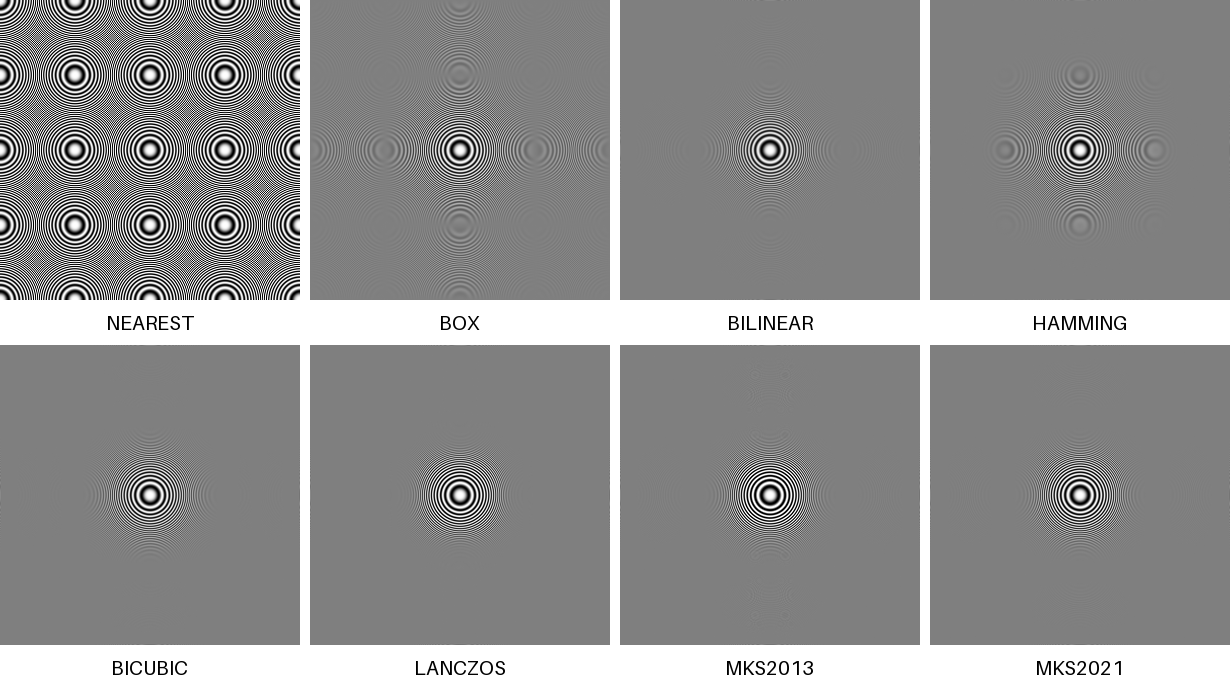
A zone plate has rings that get finer towards the edges, so it shows exactly what a filter does with detail too fine to keep. A good filter turns that detail into smooth grey; a poor one turns it into false patterns (moiré). Each image is the 1200×1200 pattern shrunk to 300×300:
from PIL import Image, ImageDraw, ImageFont

rings = Image.open("rings.png")                      # 1200 x 1200 zone plate, finer towards the edges
font = ImageFont.load_default(size=20)
names = ["NEAREST", "BOX", "BILINEAR", "HAMMING", "BICUBIC", "LANCZOS", "MKS2013", "MKS2021"]
sheet = Image.new("L", (4 * 310 - 10, 2 * 345), 255)
d = ImageDraw.Draw(sheet)
for i, name in enumerate(names):
    small = rings.resize((300, 300), getattr(Image, name))
    x, y = (i % 4) * 310, (i // 4) * 345
    sheet.paste(small, (x, y))
    d.text((x + 150, y + 322), name, font=font, fill=0, anchor="mm")
sheet.save("rings_small.png")
To put a number on it, measure two areas of the shrunk image. Where every real ring is finer than a pixel, a perfect filter gives flat grey, so any contrast left there is a false pattern. Closer to the centre the rings are still coarse enough to show, and there the contrast a filter keeps is its sharpness:
import math
from PIL import Image, ImageStat

rings = Image.open("rings.png")                      # stripes get finer with distance from the centre
small_size = 300                                     # 4x smaller
# In the shrunk image, rings further than 50 px from the centre are finer than one pixel can show.
# A perfect filter turns them into flat grey; whatever pattern is left there is aliasing (moire).
# Rings 15-40 px from the centre are coarse enough to keep: the more contrast survives there, the sharper the filter.
too_fine = Image.new("L", (small_size, small_size), 0)
too_fine.putdata([255 if math.hypot(x - 150, y - 150) > 60 else 0 for y in range(300) for x in range(300)])
keepable = Image.new("L", (small_size, small_size), 0)
keepable.putdata([255 if 15 < math.hypot(x - 150, y - 150) < 40 else 0 for y in range(300) for x in range(300)])
for name in ["NEAREST", "BOX", "BILINEAR", "HAMMING", "BICUBIC", "LANCZOS", "MKS2013", "MKS2021"]:
    small = rings.resize((small_size, small_size), getattr(Image, name))
    print(f"{name:<9} leftover pattern (stddev): {ImageStat.Stat(small, too_fine).stddev[0]:5.1f}   "
f"detail kept (stddev): {ImageStat.Stat(small, keepable).stddev[0]:5.1f}")NEAREST leftover pattern (stddev): 90.8 detail kept (stddev): 91.3
BOX leftover pattern (stddev): 10.4 detail kept (stddev): 70.6
BILINEAR leftover pattern (stddev): 1.2 detail kept (stddev): 54.2
HAMMING leftover pattern (stddev): 4.9 detail kept (stddev): 66.4
BICUBIC leftover pattern (stddev): 1.0 detail kept (stddev): 69.7
LANCZOS leftover pattern (stddev): 0.6 detail kept (stddev): 79.1
MKS2013 leftover pattern (stddev): 1.1 detail kept (stddev): 84.3
MKS2021 leftover pattern (stddev): 0.9 detail kept (stddev): 75.5Read the two charts together. BILINEAR is clean but soft; LANCZOS is clean and sharp;
MKS2013 kept about 7% more contrast than LANCZOS for barely more leftover pattern. MKS2021
landed between BICUBIC and LANCZOS on this pattern.
Speed: shrinking and enlarging
import time
from PIL import Image

photo = Image.open("photo.jpg")                     # 1600 x 1067
photo.load()
small = photo.resize((400, 267))


def best(fn):
    runs = []
    for _ in range(5):
        t = time.perf_counter(); fn(); runs.append((time.perf_counter() - t) * 1000)
    return min(runs)


for name in ["NEAREST", "BOX", "BILINEAR", "HAMMING", "BICUBIC", "LANCZOS", "MKS2013", "MKS2021"]:
    f = getattr(Image, name)
    down = best(lambda: photo.resize((400, 267), f))
    up = best(lambda: small.resize((1600, 1068), f))
print(f"{name:<9} shrink 1600->400 {down:6.2f} ms enlarge 400->1600 {up:6.2f} ms")NEAREST shrink 1600->400 0.08 ms enlarge 400->1600 0.78 ms
BOX shrink 1600->400 3.12 ms enlarge 400->1600 5.75 ms
BILINEAR shrink 1600->400 5.13 ms enlarge 400->1600 7.32 ms
HAMMING shrink 1600->400 5.24 ms enlarge 400->1600 7.57 ms
BICUBIC shrink 1600->400 9.12 ms enlarge 400->1600 10.51 ms
LANCZOS shrink 1600->400 14.38 ms enlarge 400->1600 13.90 ms
MKS2013 shrink 1600->400 10.98 ms enlarge 400->1600 12.86 ms
MKS2021 shrink 1600->400 21.25 ms enlarge 400->1600 19.51 msLANCZOS costs about 10 ms more than BILINEAR per photo here, and BILINEAR is
already nearly free of aliasing on the test pattern (HAMMING, despite its name, kept more). For photos the extra
milliseconds are worth paying; it only matters when you resize thousands of images per second.
Enlarging: what each filter invents
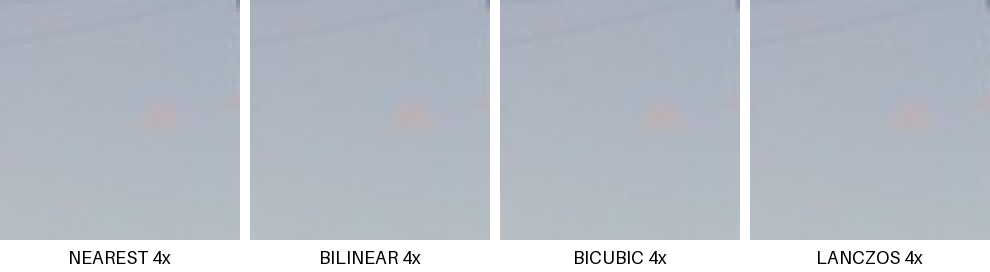
Enlarging cannot add detail; the filter only decides how to fill the gaps. A 60×60 crop enlarged 4×:
from PIL import Image, ImageDraw, ImageFont

crop = Image.open("photo.jpg").crop((960, 380, 1020, 440))     # a 60 x 60 piece of the tower
font = ImageFont.load_default(size=18)
names = ["NEAREST", "BILINEAR", "BICUBIC", "LANCZOS"]
sheet = Image.new("RGB", (4 * 250 - 10, 272), "white")
for i, name in enumerate(names):
    sheet.paste(crop.resize((240, 240), getattr(Image, name)), (i * 250, 0))
    ImageDraw.Draw(sheet).text((i * 250 + 120, 257), name + " 4x", font=font, fill="black", anchor="mm")
sheet.save("upscale.png")NEAREST keeps hard pixel edges (right for pixel art and QR codes); BILINEAR is soft;
BICUBIC and LANCZOS are sharper but add faint light and dark halos along edges.
Large images: reducing_gap and reduce()
Shrinking a big photo by a large factor spends most of its time on the full-resolution pass. reducing_gap first
shrinks by an integer factor with a fast box filter, then finishes with your filter:
import time
from PIL import Image

Image.open("photo.jpg").resize((6000, 4000)).save("big.jpg", quality=90)
big = Image.open("big.jpg")
big.load()


def best(fn):
    runs = []
    for _ in range(3):
        t = time.perf_counter(); out = fn(); runs.append((time.perf_counter() - t) * 1000)
    return min(runs), out


plain, a = best(lambda: big.resize((600, 400), Image.LANCZOS))
gap, b = best(lambda: big.resize((600, 400), Image.LANCZOS, reducing_gap=3.0))
red, _ = best(lambda: big.reduce(10))
diff = max(abs(p - q) for p, q in zip(a.convert("L").get_flattened_data(), b.convert("L").get_flattened_data()))
print(f"resize(LANCZOS)                   {plain:7.1f} ms")
print(f"resize(LANCZOS, reducing_gap=3)   {gap:7.1f} ms")
print(f"reduce(10)                        {red:7.1f} ms")
print("largest pixel difference with reducing_gap:", diff)resize(LANCZOS) 167.6 ms
resize(LANCZOS, reducing_gap=3) 55.1 ms
reduce(10) 13.0 ms
largest pixel difference with reducing_gap: 3The result differs from a plain resize by at most a few levels, which is invisible. thumbnail() uses
reducing_gap=2.0 by default, and for JPEGs it also asks the decoder for a smaller image with draft(),
which is why it is so much faster than resize() (see making
resizing fast).
Which filter, when
| Situation | Filter | Why |
|---|---|---|
| Thumbnails and web images from photos | LANCZOS | Least aliasing; the cost is small. |
| The same, on Pillow 13 only | MKS2013 | Sharper than LANCZOS, nearly as clean, a little faster. |
| Many images, speed matters | BICUBIC or reducing_gap | Nearly as clean, faster. |
| Pixel art, icons, QR codes enlarged | NEAREST | Keeps hard edges and exact colours. |
| Segmentation masks and label maps | NEAREST | Other filters blend labels into values that mean nothing. |
| Shrinking by an exact integer factor | reduce(n) or BOX | Plain averaging; very fast. |
| Machine-learning preprocessing | whatever the model was trained with | Usually BILINEAR or BICUBIC; mismatches cost accuracy. |
Sources
What this page shows comes from running its code with Pillow 13.0.0. The API details and version history were checked against these primary sources:
- Pillow documentation: Image
- Pillow handbook: concepts (modes, filters, coordinates)
- Pillow 13.0.0 release notes
Related
The outputs and images on this page are the real results of running every example with Pillow 13.0.0 on Python 3.13 (Linux) on 2026-10-29. Every example is also re-run automatically on macOS (Darwin 25.6.0, Pillow 12.3.0), Linux (Linux 6.17.0-1022-azure, Pillow 12.3.0), Windows (Windows 2025Server, Pillow 12.3.0); the line under each example shows the result per operating system. The DejaVu Sans font files sit next to each script so font examples behave the same everywhere. Sample photos: NASA/Sam Lott, public domain. Spotted something wrong? Tell us.