img.transform(size, Image.Transform.AFFINE, (a, b, c, d, e, f), resample=Image.BICUBIC) reads each output
pixel from input position (a·x + b·y + c, d·x + e·y + f). The numbers map output to input,
the inverse of the movement you want, so moving an image right by 50 needs c=-50. Always pass
resample=: the default is NEAREST, which leaves jagged edges.
Why the coefficients seem backwards
from PIL import Image, ImageDraw

img = Image.new("RGB", (200, 100), "white")
ImageDraw.Draw(img).rectangle((0, 0, 9, 9), fill="red")     # a red square in the top-left corner


def red_square(im):
    return next(((x, y) for y in range(im.height) for x in range(im.width) if im.getpixel((x, y)) == (255, 0, 0)), None)


for c in [50, -50]:
    out = img.transform(img.size, Image.Transform.AFFINE, (1, 0, c, 0, 1, 0))
    print(f"(a, b, c, d, e, f) = (1, 0, {c:>3}, 0, 1, 0): red square now at {red_square(out)}")

out = img.transform(img.size, Image.Transform.AFFINE, (1, 0, -50, 0, 1, 0))
print("what fills the uncovered area:", out.getpixel((10, 50)), "(black: the default)")(a, b, c, d, e, f) = (1, 0, 50, 0, 1, 0): red square now at None
(a, b, c, d, e, f) = (1, 0, -50, 0, 1, 0): red square now at (50, 0)
what fills the uncovered area: (0, 0, 0) (black: the default)Pillow fills the output by asking, for every output pixel, “which input pixel goes here?”. That inverse mapping
leaves no holes, but it means the six numbers describe the movement backwards: c=50 reads from 50 pixels to the
right, so the picture moves left and the red square drops out of view. The same holds for scale (a=2 shrinks
by half) and for the sign of shears and rotations. If you think in forward matrices, as most maths and graphics libraries do,
invert first; the helper below does it.
A helper that takes a normal matrix and grows the canvas
import math
from PIL import Image


def affine(img, matrix, resample=Image.BICUBIC, fillcolor=None):
    """Apply a forward 2x3 matrix (x' = a*x + b*y + c, y' = d*x + e*y + f) and grow the canvas to fit."""
    a, b, c, d, e, f = matrix
    corners = [(0, 0), (img.width, 0), (0, img.height), (img.width, img.height)]
    xs = [a * x + b * y + c for x, y in corners]
    ys = [d * x + e * y + f for x, y in corners]
    left, top = math.floor(min(xs)), math.floor(min(ys))
    size = (math.ceil(max(xs)) - left, math.ceil(max(ys)) - top)
    det = a * e - b * d                                  # invert the matrix: transform() wants output -> input
    ia, ib, id_, ie = e / det, -b / det, -d / det, a / det
    c2, f2 = c - left, f - top                           # shift so the result starts at (0, 0)
    inverse = (ia, ib, -(ia * c2 + ib * f2), id_, ie, -(id_ * c2 + ie * f2))
    return img.transform(size, Image.Transform.AFFINE, inverse, resample=resample, fillcolor=fillcolor)


photo = Image.open("photo.jpg").convert("RGBA").resize((400, 267))
sheared = affine(photo, (1, 0.4, 0, 0, 1, 0))           # shear: x moves by 0.4 per row
print("shear 0.4:", photo.size, "->", sheared.size)
squashed = affine(photo, (1.5, 0, 0, 0, 0.6, 0))         # scale x by 1.5 and y by 0.6
print("scale (1.5, 0.6):", squashed.size)
t = math.radians(30)
turned = affine(photo, (math.cos(t), math.sin(t), 0, -math.sin(t), math.cos(t), 0))   # 30 degrees counter-clockwise
print("rotate 30 via matrix:", turned.size, "| rotate(30, expand=True):", photo.rotate(30, expand=True).size)
print("corners outside the photo are transparent:", sheared.getpixel((sheared.width - 3, 2)))shear 0.4: (400, 267) -> (507, 267)
scale (1.5, 0.6): (600, 161)
rotate 30 via matrix: (480, 432) | rotate(30, expand=True): (480, 433)
corners outside the photo are transparent: (0, 0, 0, 0)It maps the four corners forward to find the size the result needs, inverts the matrix, and shifts it so nothing is cut off,
the same thing rotate(expand=True) does for rotations (the 30° sizes match within a pixel). On RGBA images the
uncovered corners are transparent; on RGB pass fillcolor. For a rotation alone, rotate(angle, center=,
translate=) is simpler; for a 90° turn or a mirror, transpose() is exact and much faster.
Every transform method on one photo
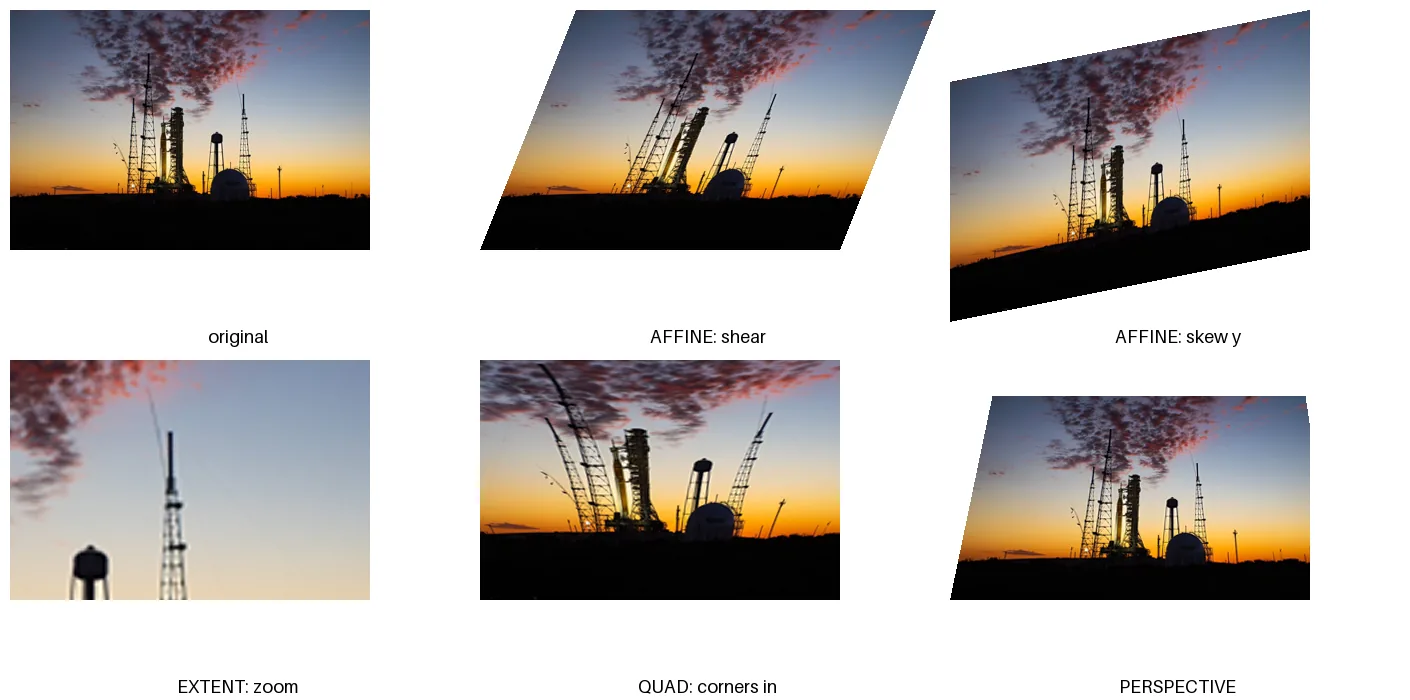
import math
from PIL import Image, ImageDraw, ImageFont

photo = Image.open("photo.jpg").convert("RGB").resize((360, 240))
W, H = photo.size
font = ImageFont.load_default(size=18)
panels = [
    ("original", photo),
    ("AFFINE: shear", photo.transform((W + 96, H), Image.Transform.AFFINE, (1, 0.4, -96, 0, 1, 0),
                                       resample=Image.BICUBIC, fillcolor="white")),
    ("AFFINE: skew y", photo.transform((W, H + 72), Image.Transform.AFFINE, (1, 0, 0, 0.2, 1, -72),
                                        resample=Image.BICUBIC, fillcolor="white")),
    ("EXTENT: zoom", photo.transform((W, H), Image.Transform.EXTENT, (180, 60, 300, 140), resample=Image.BICUBIC)),
    ("QUAD: corners in", photo.transform((W, H), Image.Transform.QUAD, (120, 40, 0, H, W, H, W - 120, 40),
                                          resample=Image.BICUBIC)),
    ("PERSPECTIVE", photo.transform((W, H), Image.Transform.PERSPECTIVE, (1.2, 0.25, -60, 0, 1.4, -50, 0, 0.0012),
                                     resample=Image.BICUBIC, fillcolor="white")),
]
sheet = Image.new("RGB", (3 * 470, 2 * (H + 110)), "white")
d = ImageDraw.Draw(sheet)
for i, (name, im) in enumerate(panels):
    x, y = (i % 3) * 470 + 10, (i // 3) * (H + 110) + 10
    im.thumbnail((456, H + 72))
    sheet.paste(im, (x, y))
    d.text((x + 228, y + H + 86), name, font=font, fill="black", anchor="mm")
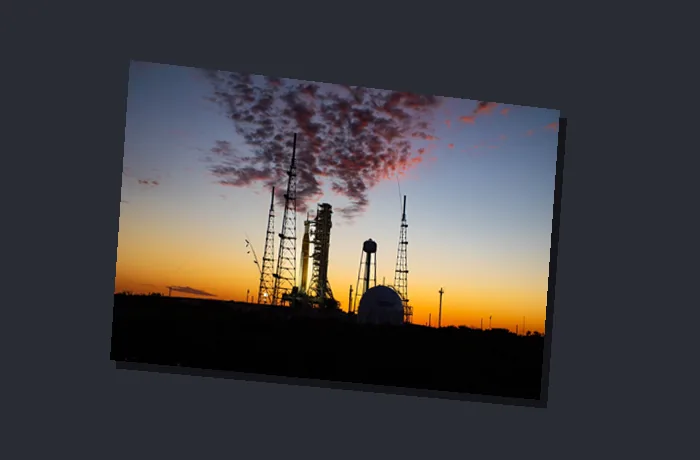
sheet.save("transforms.png")Perspective from four points: put an image on a screen
import numpy as np
from PIL import Image, ImageDraw


def perspective_coeffs(src, dst):
    """The 8 numbers transform(PERSPECTIVE) needs so that each src corner lands on its dst corner."""
    rows, rhs = [], []
    for (x, y), (u, v) in zip(dst, src):              # transform() maps output (dst) back to input (src)
        rows.append([x, y, 1, 0, 0, 0, -u * x, -u * y]); rhs.append(u)
        rows.append([0, 0, 0, x, y, 1, -v * x, -v * y]); rhs.append(v)
    return np.linalg.solve(np.array(rows, float), np.array(rhs, float)).tolist()


art = Image.open("photo.jpg").convert("RGBA").resize((400, 267))
W, H = art.size
screen = [(130, 60), (560, 110), (540, 400), (110, 360)]   # where the corners go: TL, TR, BR, BL
coeffs = perspective_coeffs([(0, 0), (W, 0), (W, H), (0, H)], screen)
warped = art.transform((700, 460), Image.Transform.PERSPECTIVE, coeffs, resample=Image.BICUBIC)

scene = Image.new("RGBA", (700, 460), (40, 44, 52, 255))
ImageDraw.Draw(scene).polygon([(x + 6, y + 8) for x, y in screen], fill=(20, 20, 24, 255))   # a shadow
scene.alpha_composite(warped)
scene.convert("RGB").save("mockup.png")

a, b, c, d, e, f, g, h = coeffs
for (x, y), want in zip(screen, [(0, 0), (W, 0), (W, H), (0, H)]):
    k = g * x + h * y + 1
    u, v = round((a * x + b * y + c) / k, 1) + 0.0, round((d * x + e * y + f) / k, 1) + 0.0
print(f"output {(x, y)} reads input ({u:6.1f}, {v:6.1f}) expected {want}")output (130, 60) reads input ( 0.0, 0.0) expected (0, 0)
output (560, 110) reads input ( 400.0, 0.0) expected (400, 0)
output (540, 400) reads input ( 400.0, 267.0) expected (400, 267)
output (110, 360) reads input ( 0.0, 267.0) expected (0, 267)Nobody picks perspective coefficients by hand. Give four corners of the input and the four places they should land, solve the eight linear equations (NumPy does it in one call), and pass the result. The check at the end runs the same formula Pillow uses: each chosen output corner reads exactly the matching corner of the photo. Without NumPy, any 8×8 linear solver works.
Straighten a photographed document
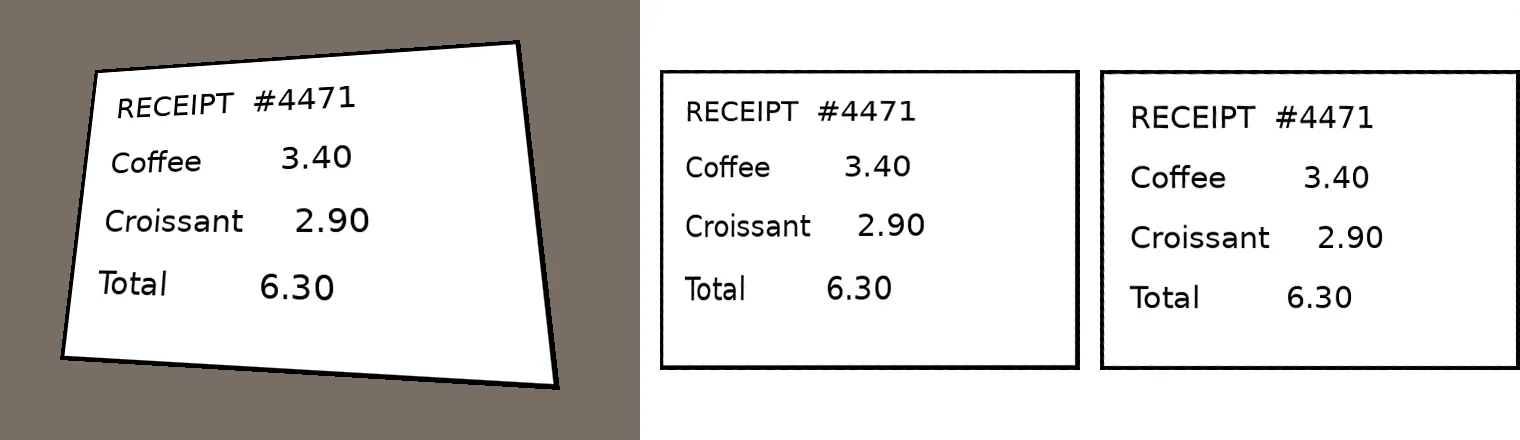
QUAD. Right: PERSPECTIVE from the same four corners.import numpy as np
from PIL import Image, ImageChops, ImageDraw, ImageFont, ImageStat
def coeffs(src, dst): # as in perspective_from_points.py
A = [[x, y, 1, 0, 0, 0, -u * x, -u * y] for (x, y), (u, v) in zip(dst, src)] + \
[[0, 0, 0, x, y, 1, -v * x, -v * y] for (x, y), (u, v) in zip(dst, src)]
return np.linalg.solve(A, [u for u, v in src] + [v for u, v in src]).tolist()
# A test card, then a photo of it taken at an angle (made with PERSPECTIVE so we know the true corners).
card = Image.new("RGB", (420, 300), "white")
d = ImageDraw.Draw(card)
d.rectangle((0, 0, 419, 299), outline="black", width=4)
for i, line in enumerate(["RECEIPT #4471", "Coffee 3.40", "Croissant 2.90", "Total 6.30"]):
d.text((30, 30 + i * 60), line, font=ImageFont.truetype("DejaVuSans.ttf", 30), fill="black")
corners = [(95, 70), (520, 40), (560, 390), (60, 360)] # TL, TR, BR, BL of the card in the "photo"
photo = Image.new("RGB", (640, 440), (120, 110, 100))
tilted = card.convert("RGBA").transform((640, 440), Image.Transform.PERSPECTIVE,
coeffs([(0, 0), (420, 0), (420, 300), (0, 300)], corners), Image.BICUBIC)
photo.paste(tilted, mask=tilted)
photo.save("tilted.png")
# Straighten, two ways. QUAD takes the corners in the order upper-left, lower-left, lower-right, upper-right.
tl, tr, br, bl = corners
by_quad = photo.transform((420, 300), Image.Transform.QUAD, (*tl, *bl, *br, *tr), resample=Image.BICUBIC)
by_persp = photo.transform((420, 300), Image.Transform.PERSPECTIVE,
coeffs(corners, [(0, 0), (420, 0), (420, 300), (0, 300)]), resample=Image.BICUBIC)
for name, flat in [("QUAD", by_quad), ("PERSPECTIVE", by_persp)]:
err = ImageStat.Stat(ImageChops.difference(card, flat).convert("L")).mean[0]
print(f"{name:<12} mean difference from the original card: {err:4.1f} of 255")
sheet = Image.new("RGB", (640 + 2 * 440, 440), "white")
sheet.paste(photo, (0, 0)); sheet.paste(by_quad, (660, 70)); sheet.paste(by_persp, (1100, 70))
sheet.save("straighten_sheet.png")QUAD mean difference from the original card: 18.8 of 255
PERSPECTIVE mean difference from the original card: 1.7 of 255Both take the four corners of the page in the photo. QUAD is the shortest to write (corners in the order upper-left,
lower-left, lower-right, upper-right), but its mapping is bilinear, not a true perspective: on a page photographed at an angle the
rows of text drift away from where they belong (compare the middle and right panels), and the result differed from the original by 11× more than with PERSPECTIVE. Solve the
PERSPECTIVE coefficients from the same four points, with the function from the previous section, and the page is back to its
original within the softening of two resamplings. Keep QUAD for slight tilts or for deliberate distortion. Pillow cannot find the
corners for you; take them from clicks in your UI, or detect them with OpenCV (cv2.findContours plus
cv2.approxPolyDP).
Smooth edges: resample and supersampling
from PIL import Image, ImageDraw, ImageStat

img = Image.new("RGB", (300, 200), "white")
ImageDraw.Draw(img).rectangle((60, 40, 240, 160), fill=(30, 90, 200))
shear = (1, 0.5, -60, 0, 1, 0)


def edge_levels(im):                                     # how many distinct shades along the slanted edges
    return len(set(im.crop((40, 40, 160, 160)).get_flattened_data()))


for name, kw in [("default (NEAREST)", {}), ("BILINEAR", {"resample": Image.BILINEAR}),
                 ("BICUBIC", {"resample": Image.BICUBIC})]:
    out = img.transform(img.size, Image.Transform.AFFINE, shear, fillcolor="white", **kw)
    print(f"{name:<18} {edge_levels(out):>4} distinct colours along the edge")

big = img.resize((600, 400), Image.NEAREST)              # supersample: transform at 2x, then shrink
out = big.transform(big.size, Image.Transform.AFFINE, (1, 0.5, -120, 0, 1, 0), Image.BICUBIC, fillcolor="white")
out = out.resize(img.size, Image.LANCZOS)
print(f"{'2x then LANCZOS':<18} {edge_levels(out):>4} distinct colours along the edge")
try:
    img.transform(img.size, Image.Transform.AFFINE, shear, resample=Image.LANCZOS)
except ValueError as e:
print("LANCZOS:", e)default (NEAREST) 2 distinct colours along the edge
BILINEAR 4 distinct colours along the edge
BICUBIC 6 distinct colours along the edge
2x then LANCZOS 25 distinct colours along the edge
LANCZOS: Image.Resampling.LANCZOS (1) cannot be used. Use Image.Resampling.NEAREST (0), Image.Resampling.BILINEAR (2) or Image.Resampling.BICUBIC (3)With the default NEAREST a slanted edge has only the two original colours, which is a staircase. BILINEAR and
BICUBIC blend along the edge; transforming at twice the size and shrinking with LANCZOS gives the smoothest result for graphics
with hard edges. transform() accepts only NEAREST, BILINEAR and BICUBIC.
Reference: methods and ImageTransform classes
Generated from Pillow 13.0.0. The ImageTransform classes wrap the data so it can be passed as one object;
the Image.Transform methods take the raw numbers.
Image.Transform methods 5
| Name and signature | What it does |
|---|---|
AFFINE | Six numbers (a, b, c, d, e, f): each output pixel (x, y) is read from input (a·x + b·y + c, d·x + e·y + f). |
EXTENT | Four numbers: a box of the input, stretched to the output size (a crop and resize in one step). |
MESH | A list of (output box, input quad) pairs, each mapped like QUAD. For warps such as waves or lens effects. |
PERSPECTIVE | Eight numbers: input = ((a·x + b·y + c) / (g·x + h·y + 1), (d·x + e·y + f) / (g·x + h·y + 1)). |
QUAD | Eight numbers: the input's upper-left, lower-left, lower-right and upper-right corners, mapped to the whole output rectangle. |
ImageTransform classes 6
| Name and signature | What it does |
|---|---|
AffineTransform(data) | Wraps the six affine coefficients: img.transform(size, AffineTransform((a, b, c, d, e, f))). |
ExtentTransform(data) | Wraps an (x0, y0, x1, y1) box of the input to stretch over the whole output. |
MeshTransform(data) | Wraps a list of (target box, source quad) pairs; what ImageOps.deform() uses. |
PerspectiveTransform(data) | Wraps the eight perspective coefficients. |
QuadTransform(data) | Wraps the eight numbers of a source quadrilateral (UL, LL, LR, UR corners). |
Transform(data) | The base class: subclass it with a method to pass your own data to transform(). |
Sources
What this page shows comes from running its code with Pillow 13.0.0. The API details and version history were checked against these primary sources:
Related
The outputs and images on this page are the real results of running every example with Pillow 13.0.0 on Python 3.13 (Linux) on 2026-10-29. Every example is also re-run automatically on macOS (Darwin 25.6.0, Pillow 12.3.0), Linux (Linux 6.17.0-1022-azure, Pillow 12.3.0), Windows (Windows 2025Server, Pillow 12.3.0); the line under each example shows the result per operating system. The DejaVu Sans font files sit next to each script so font examples behave the same everywhere. Sample photos: NASA/Sam Lott, public domain. Spotted something wrong? Tell us.