Pillow to OpenCV: cv2.cvtColor(np.array(pil_img), cv2.COLOR_RGB2BGR).
OpenCV to Pillow: Image.fromarray(cv2.cvtColor(bgr, cv2.COLOR_BGR2RGB)).
Greyscale images need no swap; RGBA uses COLOR_RGBA2BGRA / COLOR_BGRA2RGBA.
Both directions
import cv2
import numpy as np
from PIL import Image

pil_img = Image.open("photo.jpg")

# Pillow -> OpenCV
bgr = cv2.cvtColor(np.array(pil_img), cv2.COLOR_RGB2BGR)
print("OpenCV:", bgr.shape, bgr.dtype)

# OpenCV -> Pillow
back = Image.fromarray(cv2.cvtColor(bgr, cv2.COLOR_BGR2RGB))
print("Pillow:", back.mode, back.size, "identical:", np.array_equal(np.array(back), np.array(pil_img)))OpenCV: (1067, 1600, 3) uint8
Pillow: RGB (1600, 1067) identical: TrueThe round trip is lossless: same pixels, same size. Tested with OpenCV 5.0 and Pillow 12.3.
The blue-sky (or blue-skin) bug
Passing an OpenCV array straight to Image.fromarray() works without any error, which is why the mistake is so
common, but red and blue are swapped:
import cv2
import numpy as np
from PIL import Image

bgr = cv2.imread("photo.jpg")                       # OpenCV loads as BGR
wrong = Image.fromarray(bgr)                        # no conversion: red and blue swapped
right = Image.fromarray(cv2.cvtColor(bgr, cv2.COLOR_BGR2RGB))

sheet = Image.new("RGB", (810, 267), "white")
sheet.paste(wrong.resize((400, 267)), (0, 0))
sheet.paste(right.resize((400, 267)), (410, 0))
sheet.save("swap.png")
print("pixel (200, 900) wrong:", wrong.getpixel((900, 200)), " right:", right.getpixel((900, 200)))pixel (200, 900) wrong: (50, 47, 86) right: (86, 47, 50)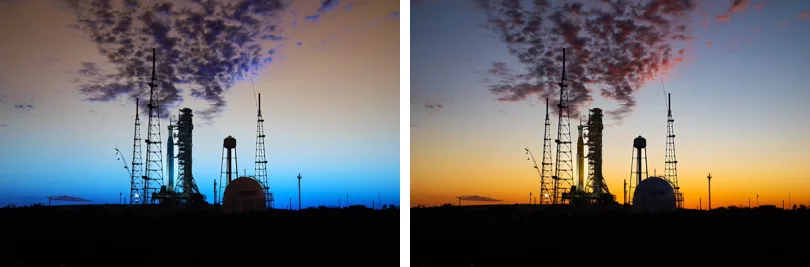
Image.fromarray(bgr). Right: converted with COLOR_BGR2RGB.Transparency (RGBA / BGRA)
import cv2
import numpy as np
from PIL import Image

logo = Image.open("logo.png")                                  # RGBA
bgra = cv2.cvtColor(np.array(logo), cv2.COLOR_RGBA2BGRA)
print("to OpenCV:", bgra.shape)
cv2.imwrite("logo_cv.png", bgra)                               # imwrite keeps the alpha channel

unchanged = cv2.imread("logo_cv.png", cv2.IMREAD_UNCHANGED)    # default imread would drop alpha
print("imread default:  ", cv2.imread("logo_cv.png").shape)
print("IMREAD_UNCHANGED:", unchanged.shape)
back = Image.fromarray(cv2.cvtColor(unchanged, cv2.COLOR_BGRA2RGBA))
print("back to Pillow:", back.mode)to OpenCV: (360, 600, 4)
imread default: (360, 600, 3)
IMREAD_UNCHANGED: (360, 600, 4)
back to Pillow: RGBAcv2.imread() drops the alpha channel unless you pass cv2.IMREAD_UNCHANGED, a frequent source of
"my transparent PNG has a black background" bugs.
Greyscale
A single-channel image has no channel order, so convert directly:
import cv2
import numpy as np
from PIL import Image

pil_gray = Image.open("photo.jpg").convert("L")
cv_gray = np.array(pil_gray)                    # 2-D array: no channel swap needed
print(cv_gray.shape)
edges = cv2.Canny(cv_gray, 80, 160)
Image.fromarray(edges).save("edges.png")
print(Image.open("edges.png").mode)(1067, 1600)
L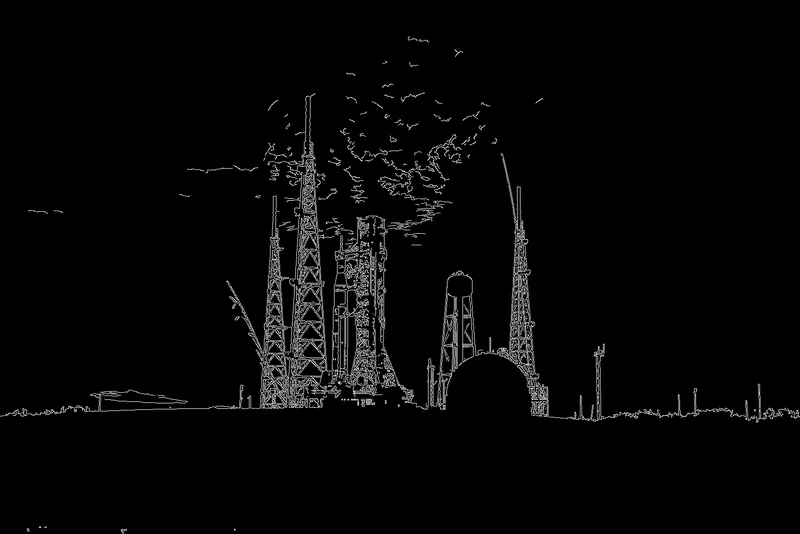
Do Pillow and OpenCV decode files identically?
Pixel values: in our test, yes. Orientation: no. We loaded the same JPEG with both libraries and compared:
import cv2
import numpy as np
from PIL import Image

via_pil = np.array(Image.open("photo.jpg"))
via_cv = cv2.cvtColor(cv2.imread("photo.jpg"), cv2.COLOR_BGR2RGB)
diff = np.abs(via_pil.astype(int) - via_cv.astype(int))
print("same shape:", via_pil.shape == via_cv.shape)
print("pixels that differ:", f"{(diff.max(axis=2) > 0).mean():.2%}", " largest difference:", diff.max())

print("Pillow orientation tag:", Image.open("phone.jpg").getexif().get(0x0112))
print("phone.jpg via Pillow:", Image.open("phone.jpg").size, " via cv2.imread:", cv2.imread("phone.jpg").shape[1::-1])same shape: True
pixels that differ: 0.00% largest difference: 0
Pillow orientation tag: 6
phone.jpg via Pillow: (1200, 800) via cv2.imread: (800, 1200)Both wheels use libjpeg-turbo, and here the decoded pixels matched exactly. That is not guaranteed across library builds and
versions, so if you compare hashes or need bit-exact results, load images with one library consistently. The orientation
difference is visible and systematic: cv2.imread() applies the EXIF rotation by default, while Pillow gives you the
stored pixels until you call ImageOps.exif_transpose(). Mixing the two silently swaps width and height for phone photos.
Speed
import time
import cv2
import numpy as np
from PIL import Image

img = Image.open("photo.jpg").resize((3200, 2134))
img.load()


def best(fn, n=10):
    t = []
    for _ in range(n):
        s = time.perf_counter(); fn(); t.append(time.perf_counter() - s)
    return min(t) * 1000


a = np.array(img)
print(f"np.array(img)              {best(lambda: np.array(img)):6.1f} ms")
print(f"np.asarray(img)            {best(lambda: np.asarray(img)):6.1f} ms")
print(f"cv2.cvtColor RGB->BGR      {best(lambda: cv2.cvtColor(a, cv2.COLOR_RGB2BGR)):6.1f} ms")
print(f"a[..., ::-1] (view)        {best(lambda: a[..., ::-1]):6.3f} ms")
print(f"Image.fromarray(a) {best(lambda: Image.fromarray(a)):6.1f} ms")np.array(img) 31.2 ms
np.asarray(img) 24.8 ms
cv2.cvtColor RGB->BGR 0.4 ms
a[..., ::-1] (view) 0.000 ms
Image.fromarray(a) 3.6 msConversions are cheap compared with decoding or processing. a[..., ::-1] is nearly free because it returns a view,
but the view is not contiguous in memory; some OpenCV functions will copy it or reject it, so cvtColor is the safer
default.
For a code generator covering Base64 and PyTorch tensors too, see the OpenCV converter tool.
Related
The outputs and images on this page are the real results of running every example with Pillow 12.3.0 on Python 3.13 (Linux) on 2026-10-15. Every example is also re-run automatically on macOS (Darwin 25.6.0, Pillow 12.3.0), Linux (Linux 6.17.0-1022-azure, Pillow 12.3.0), Windows (Windows 2025Server, Pillow 12.3.0); the line under each example shows the result per operating system. The DejaVu Sans font files sit next to each script so font examples behave the same everywhere. Sample photos: NASA/Sam Lott, public domain. Spotted something wrong? Tell us.