For photos: resize to the size you actually display, then save as JPEG with quality=80–85, optimize=True,
or as WebP with quality=80. For graphics: PNG with optimize=True, and a palette via
img.quantize(colors) if it has few colours. Every number below was measured on the same 1600×1067 photo.
JPEG quality: the biggest lever
import io
from PIL import Image

img = Image.open("photo.jpg")
print("original file:", round(len(open("photo.jpg", "rb").read()) / 1024), "KB")
for q in [95, 90, 85, 80, 70, 60, 40]:
    buf = io.BytesIO()
    img.save(buf, "JPEG", quality=q)
print(f"quality={q:<3} {buf.tell() / 1024:7.1f} KB")original file: 233 KB
quality=95 300.4 KB
quality=90 223.1 KB
quality=85 188.9 KB
quality=80 134.7 KB
quality=70 111.1 KB
quality=60 90.5 KB
quality=40 72.4 KBSize drops steeply from 95 to 80 and much more slowly below 70, while visible damage grows. Note that re-saving at quality 95 made the file bigger than the original: quality above the original's own setting only adds bytes. Zoomed in on the same detail at quality 90, 60, 30 and 10:
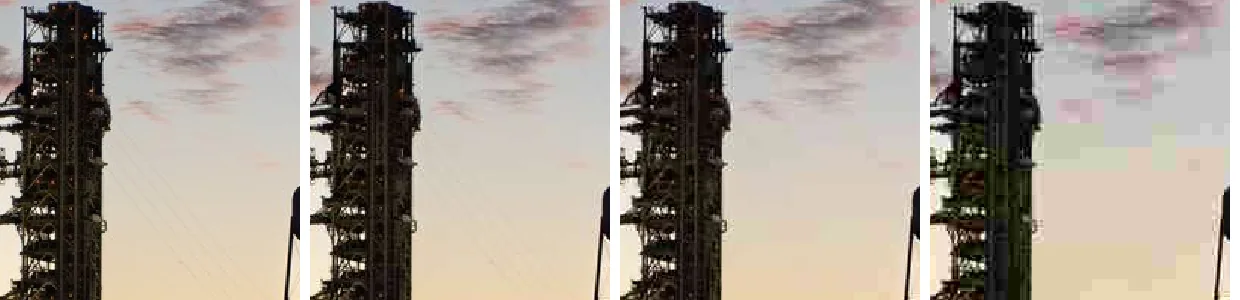
from PIL import Image

img = Image.open("photo.jpg")
crop = (700, 430, 900, 630)                       # zoom on the rocket
tiles = []
for q in [90, 60, 30, 10]:
    img.save(f"q{q}.jpg", quality=q)
    tiles.append(Image.open(f"q{q}.jpg").crop(crop).resize((300, 300), Image.NEAREST))
sheet = Image.new("RGB", (4 * 310, 300), "white")
for i, t in enumerate(tiles):
    sheet.paste(t, (i * 310, 0))
sheet.save("quality_zoom.png")Pillow's default is 75. Values above 95 make files much bigger for no visible gain.
Free savings: optimize, progressive, subsampling
import io
from PIL import Image

img = Image.open("photo.jpg")


def size(**opts):
    buf = io.BytesIO()
    img.save(buf, "JPEG", quality=85, **opts)
    return buf.tell() / 1024


base = size()
for label, opts in [("quality=85", {}),
                    ("+ optimize=True", {"optimize": True}),
                    ("+ progressive=True", {"optimize": True, "progressive": True}),
                    ("+ subsampling=0 (4:4:4)", {"optimize": True, "subsampling": 0}),
                    ("+ subsampling=2 (4:2:0)", {"optimize": True, "subsampling": 2})]:
    s = size(**opts)
print(f"{label:<26} {s:7.1f} KB ({(s - base) / base:+.0%})")quality=85 188.9 KB (+0%)
+ optimize=True 183.8 KB (-3%)
+ progressive=True 175.4 KB (-7%)
+ subsampling=0 (4:4:4) 223.3 KB (+18%)
+ subsampling=2 (4:2:0) 183.8 KB (-3%)optimize=Truecomputes better Huffman tables. It is lossless and only costs a little encoding time.progressive=Truelets browsers show a blurry preview while loading, and here it also saved a few more percent.subsamplingcontrols colour resolution.2(4:2:0, the default for most qualities) halves colour detail and is invisible on photos;0(4:4:4) keeps full colour, which helps red text or fine coloured lines but costs bytes.
Resize first: the bigger win
Halving the width removes three-quarters of the pixels:
import io
from PIL import Image

img = Image.open("photo.jpg")
for width in [1600, 1200, 800, 400]:
    small = img.resize((width, round(img.height * width / img.width)), Image.LANCZOS)
    buf = io.BytesIO()
    small.save(buf, "JPEG", quality=85, optimize=True)
print(f"{width:>5} px wide {buf.tell() / 1024:7.1f} KB")1600 px wide 183.8 KB
1200 px wide 99.2 KB
800 px wide 51.6 KB
400 px wide 16.6 KBServe images at the size they are displayed (or 2× for high-density screens). See resizing without distortion.
Metadata and colour profiles
EXIF data and ICC profiles are dropped unless you pass them to save(). The profile on our photo is small:
import io
from PIL import Image

img = Image.open("photo.jpg")
icc = img.info.get("icc_profile")
for label, opts in [("with ICC profile", {"icc_profile": icc}), ("without", {})]:
    buf = io.BytesIO()
    img.save(buf, "JPEG", quality=85, optimize=True, **opts)
    print(f"{label:<17} {buf.tell():8,d} bytes")
print("profile size:", len(icc), "bytes")with ICC profile 188,751 bytes
without 188,185 bytes
profile size: 548 bytesKeep the ICC profile for wide-gamut photos (this one is Display P3; without the profile, browsers show it less saturated). Dropping EXIF also removes GPS location, which is often what you want for user uploads.
PNG: optimize and palettes
import io
from PIL import Image

def kb(img, **opts):
    buf = io.BytesIO(); img.save(buf, "PNG", **opts); return buf.tell() / 1024

logo = Image.open("logo.png")                         # flat graphic with transparency
print(f"logo, default            {kb(logo):6.1f} KB")
print(f"logo, optimize           {kb(logo, optimize=True):6.1f} KB")
print(f"logo, 16-colour palette  {kb(logo.quantize(16), optimize=True):6.1f} KB")

shot = Image.open("photo.jpg").resize((800, 534))
print(f"photo, PNG               {kb(shot, optimize=True):6.1f} KB")
print(f"photo, 64-colour palette {kb(shot.quantize(64), optimize=True):6.1f} KB")logo, default 3.8 KB
logo, optimize 3.1 KB
logo, 16-colour palette 1.9 KB
photo, PNG 411.1 KB
photo, 64-colour palette 74.5 KBA palette (quantize) is very effective on logos, charts and screenshots, and keeps transparency. On photos it
causes banding; use JPEG or WebP for photos instead of fighting PNG.
WebP and AVIF
import io
from PIL import Image

img = Image.open("photo.jpg")
for label, fmt, opts in [("JPEG q85 optimize", "JPEG", {"quality": 85, "optimize": True}),
                         ("WebP q80", "WEBP", {"quality": 80}),
                         ("WebP q80 method=6", "WEBP", {"quality": 80, "method": 6}),
                         ("AVIF q60", "AVIF", {"quality": 60})]:
    buf = io.BytesIO()
    img.save(buf, fmt, **opts)
print(f"{label:<20} {buf.tell() / 1024:7.1f} KB")JPEG q85 optimize 183.8 KB
WebP q80 78.3 KB
WebP q80 method=6 75.3 KB
AVIF q60 61.9 KBBoth are supported by all current browsers. Quality numbers are not comparable between formats, so compare visually; the format conversion guide has a fuller comparison.
Compress to a target size
Upload limits ("max 100 KB") are common. Binary-search the highest quality that fits, and when even low quality is not enough, shrink the image instead of going below quality 20, where JPEG artefacts become severe:
import io
from PIL import Image


def jpeg_under(img, max_kb, lo=20, hi=95):
    """Highest JPEG quality that fits under max_kb, found by binary search."""
    img = img.convert("RGB")
    best = None
    while lo <= hi:
        q = (lo + hi) // 2
        buf = io.BytesIO()
        img.save(buf, "JPEG", quality=q, optimize=True)
        if buf.tell() <= max_kb * 1024:
            best, lo = (q, buf.getvalue()), q + 1
        else:
            hi = q - 1
    if best is None:
        raise ValueError(f"cannot reach {max_kb} KB at quality {lo}; resize the image first")
    return best


img = Image.open("photo.jpg")
for target in [150, 80, 40]:
    try:
        q, data = jpeg_under(img, target)
        print(f"under {target:>3} KB -> quality {q:>2}, {len(data) / 1024:6.1f} KB")
    except ValueError as e:
        smaller = img.resize((img.width // 2, img.height // 2), Image.LANCZOS)
        q, data = jpeg_under(smaller, target)
        print(f"under {target:>3} KB -> {e}")
print(f" half size instead: quality {q}, {len(data) / 1024:.1f} KB")under 150 KB -> quality 82, 145.9 KB
under 80 KB -> quality 56, 79.9 KB
under 40 KB -> cannot reach 40 KB at quality 20; resize the image first
half size instead: quality 76, 39.2 KBOn this photo, 40 KB was out of reach at full size, and halving the dimensions got there at a much better quality than squeezing the full-size image would have.
Related
The outputs and images on this page are the real results of running every example with Pillow 12.3.0 on Python 3.13 (Linux) on 2026-10-15. Every example is also re-run automatically on macOS (Darwin 25.6.0, Pillow 12.3.0), Linux (Linux 6.17.0-1022-azure, Pillow 12.3.0), Windows (Windows 2025Server, Pillow 12.3.0); the line under each example shows the result per operating system. The DejaVu Sans font files sit next to each script so font examples behave the same everywhere. Sample photos: NASA/Sam Lott, public domain. Spotted something wrong? Tell us.