If colours look washed out or shift after processing, the image has a colour profile (usually Display P3 from a phone or
Mac) that was dropped. Convert to sRGB with
ImageCms.profileToProfile(img, ImageCms.ImageCmsProfile(io.BytesIO(img.info["icc_profile"])),
    ImageCms.createProfile("sRGB"))
, or keep the profile by passing icc_profile=img.info.get("icc_profile") to
save(). Pillow never converts colours on its own.
Is there a profile? Reading it
import io
from PIL import Image, ImageCms

img = Image.open("photo.jpg")
icc = img.info.get("icc_profile")                        # raw bytes, or None when the file has no profile
print("embedded profile:", "yes," if icc else "no", len(icc) if icc else "", "bytes")
profile = ImageCms.ImageCmsProfile(io.BytesIO(icc))
print("description: ", ImageCms.getProfileDescription(profile).strip())
print("copyright:   ", ImageCms.getProfileCopyright(profile).strip())
print("colour space:", profile.profile.xcolor_space, "| connection space:", profile.profile.connection_space)
print("version:     ", profile.profile.version)
print("untagged file:", Image.open("logo.png").info.get("icc_profile"))embedded profile: yes, 548 bytes
description: Display P3
copyright: Copyright Apple Inc., 2015
colour space: RGB | connection space: XYZ
version: 4.0
untagged file: NoneThe profile travels in img.info["icc_profile"] as raw bytes. Pillow reads it from JPEG, PNG, WebP, AVIF, TIFF and
HEIF files and exposes it, but does not apply it. No profile means sRGB by convention, which is what browsers assume too.
Display P3 to sRGB, and why it matters
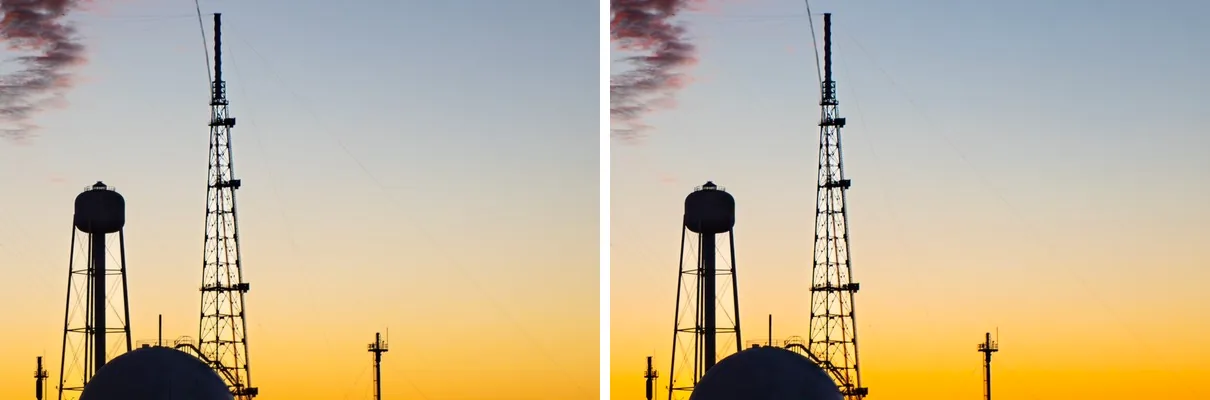
profileToProfile().import io
from PIL import Image, ImageChops, ImageCms, ImageStat
img = Image.open("photo.jpg") # Display P3
p3 = ImageCms.ImageCmsProfile(io.BytesIO(img.info["icc_profile"]))
srgb = ImageCms.createProfile("sRGB")
web = ImageCms.profileToProfile(img, p3, srgb, outputMode="RGB")
print("output profile:", ImageCms.getProfileDescription(ImageCms.ImageCmsProfile(io.BytesIO(web.info["icc_profile"]))).strip())
web.save("photo_srgb.jpg", quality=90, icc_profile=web.info["icc_profile"]) # JPEG needs it passed explicitly
diff = ImageChops.difference(img.convert("RGB"), web)
print("mean change per channel (R, G, B):", [round(v, 1) for v in ImageStat.Stat(diff).mean])
print("largest change per channel:", [hi for lo, hi in diff.getextrema()])
sat = [ImageStat.Stat(im.convert("HSV")).mean[1] for im in (img.convert("RGB"), web)]
print(f"mean saturation: P3 numbers {sat[0]:.1f} -> converted {sat[1]:.1f}")
crop = (820, 360, 1420, 760) # the sunset behind the tower
side = Image.new("RGB", (1210, 400), "white")
side.paste(img.convert("RGB").crop(crop), (0, 0)) # P3 numbers shown as if they were sRGB
side.paste(web.crop(crop), (610, 0))
side.save("p3_vs_srgb.png")output profile: sRGB built-in
mean change per channel (R, G, B): [2.9, 0.9, 4.0]
largest change per channel: [19, 26, 71]
mean saturation: P3 numbers 68.4 -> converted 76.4The same numbers mean more saturated colours in Display P3 than in sRGB, so reading P3 pixels as if they were sRGB makes the
sunset duller. That is what happens when a script strips the profile: a plain JPEG or WebP save does (see
what a plain save keeps), and so does every tool that ignores
info. Converting changes the numbers so that sRGB shows the intended colour; here mostly red and blue moved, by up to
71 levels in the most saturated areas. Colours outside sRGB's gamut are clipped to its edge, which is unavoidable for a web image.
A to_srgb() function for any image
import io
from PIL import Image, ImageCms

SRGB = ImageCms.ImageCmsProfile(ImageCms.createProfile("sRGB"))


def to_srgb(img):
    # Returns an RGB or RGBA image in sRGB, whatever profile and mode it came with.
    mode = "RGBA" if img.has_transparency_data else "RGB"
    icc = img.info.get("icc_profile")
    if not icc:
        return img.convert(mode)                         # no profile: the numbers are sRGB by convention
    src = ImageCms.ImageCmsProfile(io.BytesIO(icc))
    space = src.profile.xcolor_space.strip()             # "RGB", "CMYK" or "GRAY"
    if img.mode == "CMYK" and space == "CMYK":
        return ImageCms.profileToProfile(img, src, SRGB, outputMode="RGB")
    if space != "RGB":
        return img.convert(mode)                         # a profile that does not fit these pixels: ignore it
    return ImageCms.profileToProfile(img.convert(mode), src, SRGB, outputMode=mode)


for name, img in [("P3 photo", Image.open("photo.jpg")), ("untagged PNG", Image.open("logo.png")),
                  ("P3 with alpha", Image.open("photo.jpg").convert("RGBA"))]:
    if name == "P3 with alpha":
        img.info["icc_profile"] = Image.open("photo.jpg").info["icc_profile"]
    out = to_srgb(img)
    print(f"{name:<14} {img.mode:<5} -> {out.mode:<5}",
          ImageCms.getProfileDescription(ImageCms.ImageCmsProfile(io.BytesIO(out.info["icc_profile"]))).strip()
if "icc_profile" in out.info else "(no profile, already sRGB)")P3 photo RGB -> RGB sRGB built-in
untagged PNG RGBA -> RGBA (no profile, already sRGB)
P3 with alpha RGBA -> RGBA sRGB built-inPut this at the start of an upload or thumbnail pipeline. Images without a profile pass through, images with transparency keep it, and a profile that does not match the pixels (it happens with edited files) is ignored instead of raising. LittleCMS can apply an RGB profile to RGBA images directly, so alpha is carried through unchanged.
RGB to Lab, and measuring colour difference
import math
from PIL import Image, ImageCms

srgb, lab = ImageCms.createProfile("sRGB"), ImageCms.createProfile("LAB")
rgb_to_lab = ImageCms.buildTransform(srgb, lab, "RGB", "LAB")      # build once, reuse for every image


def to_lab(rgb):
    L, a, b = ImageCms.applyTransform(Image.new("RGB", (1, 1), rgb), rgb_to_lab).getpixel((0, 0))
    return L * 100 / 255, a - 128, b - 128               # Pillow's LAB mode stores L as 0-255 and a, b offset by 128


for rgb in [(255, 255, 255), (0, 0, 0), (128, 128, 128), (255, 0, 0), (0, 128, 0), (0, 0, 255)]:
    L, a, b = to_lab(rgb)
    print(f"RGB {str(rgb):<16} L* {L:5.1f}  a* {a:4d}  b* {b:4d}")


def delta_e(c1, c2):                                     # CIE76: straight-line distance in Lab
    return math.dist(to_lab(c1), to_lab(c2))


for c1, c2 in [((200, 30, 30), (210, 30, 30)), ((30, 30, 200), (30, 30, 210)), ((40, 160, 40), (40, 170, 40)),
               ((200, 30, 30), (30, 30, 200))]:
    print(f"delta E {c1} vs {c2}: {delta_e(c1, c2):5.1f}")
try:
    Image.new("RGB", (1, 1)).convert("LAB")
except ValueError as e:
print("img.convert('LAB'):", e)RGB (255, 255, 255) L* 100.0 a* 0 b* 0
RGB (0, 0, 0) L* 0.0 a* 0 b* 0
RGB (128, 128, 128) L* 53.7 a* 0 b* 0
RGB (255, 0, 0) L* 54.1 a* 81 b* 70
RGB (0, 128, 0) L* 46.3 a* -48 b* 49
RGB (0, 0, 255) L* 29.4 a* 68 b* -112
delta E (200, 30, 30) vs (210, 30, 30): 4.3
delta E (30, 30, 200) vs (30, 30, 210): 3.8
delta E (40, 160, 40) vs (40, 170, 40): 5.3
delta E (200, 30, 30) vs (30, 30, 200): 136.0Lab is designed so that equal distances look like roughly equal differences, which RGB is not: the same 10-level step
measures 3.8 in a saturated blue, 4.3 in a red and 5.3 in a green, as the delta E lines show. Use it to find
“similar” colours or to match colours across images; a delta E around 2 is about the smallest difference most people
notice. img.convert("LAB") does not exist; the transform does the conversion, and Pillow's LAB mode stores
the values scaled as the comments show. The built-in LAB profile uses the D50 white point of ICC profiles.
Rendering intents
import io
from PIL import Image, ImageChops, ImageCms

img = Image.open("photo.jpg")
p3 = ImageCms.ImageCmsProfile(io.BytesIO(img.info["icc_profile"]))
srgb = ImageCms.ImageCmsProfile(ImageCms.createProfile("sRGB"))
print("default intent of the P3 profile:", ImageCms.Intent(ImageCms.getDefaultIntent(p3)).name)
results = {}
for intent in ImageCms.Intent:
    supported = ImageCms.isIntentSupported(p3, intent, ImageCms.Direction.INPUT)
    results[intent.name] = ImageCms.profileToProfile(img, p3, srgb, renderingIntent=intent, outputMode="RGB")
    print(f"{intent.name:<22} supported: {bool(supported)}")
base = results["PERCEPTUAL"]
for name, out in results.items():
print(f"{name:<22} differs from PERCEPTUAL by up to {max(hi for lo, hi in ImageChops.difference(base, out).getextrema())}")default intent of the P3 profile: PERCEPTUAL
PERCEPTUAL supported: True
RELATIVE_COLORIMETRIC supported: True
SATURATION supported: True
ABSOLUTE_COLORIMETRIC supported: True
PERCEPTUAL differs from PERCEPTUAL by up to 0
RELATIVE_COLORIMETRIC differs from PERCEPTUAL by up to 0
SATURATION differs from PERCEPTUAL by up to 0
ABSOLUTE_COLORIMETRIC differs from PERCEPTUAL by up to 51The intent says what to do with colours the output cannot show. Between two matrix-based RGB profiles like Display P3 and sRGB,
perceptual, relative colorimetric and saturation gave identical pixels; the choice between them matters with printer profiles,
which contain a lookup table per intent. ABSOLUTE_COLORIMETRIC is the odd one out: it does not map the source white to
the output white, so it shifted colours by up to 51 levels here. It exists for proofing paper colour, not for converting photos.
PERCEPTUAL compresses the whole gamut to keep relationships between colours (good for photos),
RELATIVE_COLORIMETRIC keeps in-gamut colours exact and clips the rest (good for logos and proofs).
CMYK: what convert() does without a profile
from PIL import Image

for rgb in [(255, 0, 0), (40, 40, 40), (0, 0, 0)]:
    print(f"RGB {str(rgb):<14} -> convert('CMYK') {Image.new('RGB', (1, 1), rgb).convert('CMYK').getpixel((0, 0))}")
back = Image.new("CMYK", (1, 1), (0, 0, 0, 255)).convert("RGB").getpixel((0, 0))
print("CMYK (0, 0, 0, 255) -> RGB", back)RGB (255, 0, 0) -> convert('CMYK') (0, 255, 255, 0)
RGB (40, 40, 40) -> convert('CMYK') (215, 215, 215, 0)
RGB (0, 0, 0) -> convert('CMYK') (255, 255, 255, 0)
CMYK (0, 0, 0, 255) -> RGB (0, 0, 0)convert("CMYK") is a plain inversion: C, M, Y are 255 minus R, G, B and black (K) is always 0, so dark greys and
black are printed as a mix of three inks instead of black ink. That is fine for previews and wrong for print. For print, convert
with the printer's or the print shop's CMYK profile (for example a FOGRA or GRACoL profile file):
profileToProfile(img, srgb, "printer.icc", outputMode="CMYK"). In the other direction, Pillow reads CMYK JPEGs
correctly, including Adobe's inverted ones, and if the file has an embedded CMYK profile, converting with it gives the colours
the designer saw.
Errors you will meet
import io
from PIL import Image, ImageCms

img = Image.open("photo.jpg")
p3 = ImageCms.ImageCmsProfile(io.BytesIO(img.info["icc_profile"]))
srgb = ImageCms.createProfile("sRGB")
transform = ImageCms.buildTransform(p3, srgb, "RGB", "RGB")
for mode in ["L", "RGBA"]:
    try:
        ImageCms.applyTransform(img.convert(mode), transform)
    except ImageCms.PyCMSError as e:
        print(f"applyTransform on {mode}: PyCMSError: {e}")
try:
    ImageCms.ImageCmsProfile(io.BytesIO(b"not a profile"))
except (OSError, ImageCms.PyCMSError, TypeError) as e:
    print("broken profile bytes:", type(e).__name__, e)
print("inPlace returns:", ImageCms.profileToProfile(img.copy(), p3, srgb, inPlace=True))applyTransform on L: PyCMSError: mode mismatch
applyTransform on RGBA: PyCMSError: mode mismatch
broken profile bytes: OSError cannot open profile from string
inPlace returns: NoneA transform is built for exact modes, and since Pillow 12.3 applying it to an image of another mode raises
PyCMSError: mode mismatch instead of reading memory as the wrong layout. Build one transform per mode, or convert first.
With inPlace=True, the functions change the image and return None, the usual in-place trap.
Speed
import io
import time
from PIL import Image, ImageCms

img = Image.open("photo.jpg")
rgb = img.convert("RGB")
p3 = ImageCms.ImageCmsProfile(io.BytesIO(img.info["icc_profile"]))
srgb = ImageCms.createProfile("sRGB")


def best(fn, n=5):
    runs = []
    for _ in range(n):
        t = time.perf_counter(); fn(); runs.append((time.perf_counter() - t) * 1000)
    return min(runs)


transform = ImageCms.buildTransform(p3, srgb, "RGB", "RGB")
print(f"buildTransform (once)         {best(lambda: ImageCms.buildTransform(p3, srgb, 'RGB', 'RGB')):7.2f} ms")
print(f"applyTransform, 1600x1067     {best(lambda: ImageCms.applyTransform(rgb, transform)):7.2f} ms")
print(f"profileToProfile, 1600x1067   {best(lambda: ImageCms.profileToProfile(rgb, p3, srgb)):7.2f} ms")
print(f"convert('L'), for comparison {best(lambda: rgb.convert('L')):7.2f} ms")buildTransform (once) 2.02 ms
applyTransform, 1600x1067 20.72 ms
profileToProfile, 1600x1067 22.65 ms
convert('L'), for comparison 1.33 msBuilding a transform is cheap next to applying it, so profileToProfile() costs about the same as a reused transform
for one image. Reusing a transform still pays off for thousands of small images. Pillow 13's release notes report ImageCms
transforms up to 3× faster than Pillow 12.
All ImageCms functions and classes
Generated from Pillow 13.0.0, so the lists and signatures are complete for that version. Pillow 12 removed
ImageCms.versions() (use PIL.features.version("littlecms2")) and Pillow 13 removed the
product_name and product_info attributes of profiles.
ImageCms functions 17
| Name and signature | What it does |
|---|---|
applyTransform(im, transform, inPlace=False) | Applies a built transform to an image; returns a new image, or None with inPlace=True. The image mode must match the transform's input mode. |
buildProofTransform(inputProfile, outputProfile, proofProfile, inMode, outMode, renderingIntent=Intent.PERCEPTUAL, proofRenderingIntent=Intent.ABSOLUTE_COLORIMETRIC, flags=Flags.SOFTPROOFING) | Builds a soft-proofing transform: shows on screen how an image will look when printed with a proof (printer) profile. |
buildProofTransformFromOpenProfiles(inputProfile, outputProfile, proofProfile, inMode, outMode, renderingIntent=Intent.PERCEPTUAL, proofRenderingIntent=Intent.ABSOLUTE_COLORIMETRIC, flags=Flags.SOFTPROOFING) | Alias of buildProofTransform, kept for old code. |
buildTransform(inputProfile, outputProfile, inMode, outMode, renderingIntent=Intent.PERCEPTUAL, flags=Flags.NONE) | Builds a reusable transform from an input to an output profile for given modes and intent. Build once, apply to many images. |
buildTransformFromOpenProfiles(inputProfile, outputProfile, inMode, outMode, renderingIntent=Intent.PERCEPTUAL, flags=Flags.NONE) | Alias of buildTransform, kept for old code. |
createProfile(colorSpace, colorTemp=0) | A built-in profile: "sRGB", "LAB" or "XYZ". LAB takes a white point colour temperature. |
get_display_profile(handle=None) | The current display's profile on Windows; None on other systems. |
getDefaultIntent(profile) | The rendering intent the profile's author marked as default (an integer; see Intent). |
getOpenProfile(profileFilename) | Opens a profile from a path or file object; the same as ImageCmsProfile(...). |
getProfileCopyright(profile) | The copyright text stored in the profile. |
getProfileDescription(profile) | The profile's description, e.g. “Display P3” or “sRGB IEC61966-2.1”. |
getProfileInfo(profile) | The description, copyright and other text tags together, as one string. |
getProfileManufacturer(profile) | The device manufacturer tag (often empty). |
getProfileModel(profile) | The device model tag (often empty). |
getProfileName(profile) | A short name built from the description, manufacturer and model. |
isIntentSupported(profile, intent, direction) | Whether a profile supports an intent in a direction (input, output or proof). |
profileToProfile(im, inputProfile, outputProfile, renderingIntent=Intent.PERCEPTUAL, outputMode=None, inPlace=False, flags=Flags.NONE) | Converts an image between two profiles in one call (builds and applies a transform). The result's info["icc_profile"] is the output profile. |
ImageCms classes 6
| Name and signature | What it does |
|---|---|
Direction(*values) | INPUT, OUTPUT, PROOF: which way a profile is used, for isIntentSupported(). |
Flags(*values) | LittleCMS transform flags, such as BLACKPOINTCOMPENSATION, SOFTPROOFING and GAMUTCHECK. |
ImageCmsProfile(profile) | An opened ICC profile, from a path, file object or a createProfile() result. tobytes() gives the bytes to embed with save(icc_profile=). |
ImageCmsTransform(input, output, input_mode, output_mode, intent=Intent.PERCEPTUAL, proof=None, proof_intent=Intent.ABSOLUTE_COLORIMETRIC, flags=Flags.NONE) | A built transform. Usable as an image filter: img.filter(transform). |
Intent(*values) | Rendering intents: PERCEPTUAL, RELATIVE_COLORIMETRIC, SATURATION, ABSOLUTE_COLORIMETRIC. |
PyCMSError(...) | The exception ImageCms raises (a subclass of Exception), for example for a mode that does not match the transform. |
Sources
What this page shows comes from running its code with Pillow 13.0.0. The API details and version history were checked against these primary sources:
Related
The outputs and images on this page are the real results of running every example with Pillow 13.0.0 on Python 3.13 (Linux) on 2026-10-29. Every example is also re-run automatically on macOS (Darwin 25.6.0, Pillow 12.3.0), Linux (Linux 6.17.0-1022-azure, Pillow 12.3.0), Windows (Windows 2025Server, Pillow 12.3.0); the line under each example shows the result per operating system. The DejaVu Sans font files sit next to each script so font examples behave the same everywhere. Sample photos: NASA/Sam Lott, public domain. Spotted something wrong? Tell us.