Loop over rows and columns and crop() each box. Compute the edges as
c * width // cols and (c + 1) * width // cols, so tiles always meet exactly and cover the whole
image, even when the size doesn't divide evenly.
Into an N × M grid
from PIL import Image

img = Image.open("photo.jpg")                 # 1600 x 1067
rows, cols = 2, 3

tiles = []
for r in range(rows):
    for c in range(cols):
        box = (c * img.width // cols, r * img.height // rows,
               (c + 1) * img.width // cols, (r + 1) * img.height // rows)
        tile = img.crop(box)
        tile.save(f"tile_r{r}_c{c}.png")
        tiles.append(tile)
print(f"r{r} c{c}", box, tile.size)r0 c0 (0, 0, 533, 533) (533, 533)
r0 c1 (533, 0, 1066, 533) (533, 533)
r0 c2 (1066, 0, 1600, 533) (534, 533)
r1 c0 (0, 533, 533, 1067) (533, 534)
r1 c1 (533, 533, 1066, 1067) (533, 534)
r1 c2 (1066, 533, 1600, 1067) (534, 534)1600 / 3 is 533.33, so the columns come out 533, 533 and 534 pixels wide, and the rows 533 and 534 high. Computing each edge from the full width (rather than adding a fixed tile width) spreads the remainder, never leaves a gap and never crops past the edge. If you need all tiles identical, crop the image to a multiple of the tile size first.
Fixed-size tiles
For tiles of a given pixel size, the last row and column are usually partial. Keep them smaller, or pad them:
from PIL import Image


def tiles(img, size, pad=False, fill=(0, 0, 0)):
    """Yield (x, y, tile) for size x size tiles. Edge tiles are smaller unless pad=True."""
    for y in range(0, img.height, size):
        for x in range(0, img.width, size):
            tile = img.crop((x, y, min(x + size, img.width), min(y + size, img.height)))
            if pad and tile.size != (size, size):
                full = Image.new(img.mode, (size, size), fill)
                full.paste(tile, (0, 0))
                tile = full
            yield x, y, tile


img = Image.open("photo.jpg")
sizes = {}
for x, y, t in tiles(img, 512):
    sizes[t.size] = sizes.get(t.size, 0) + 1
print("512 tiles, no padding:", sizes)
print("512 tiles, padded: ", {t.size for _, _, t in tiles(img, 512, pad=True)})512 tiles, no padding: {(512, 512): 6, (64, 512): 2, (512, 43): 3, (64, 43): 1}
512 tiles, padded: {(512, 512)}The 1600×1067 photo gives 4 × 3 = 12 tiles: six full ones and six smaller ones along the right and bottom edges. Padding makes every tile the same shape, which models and tile servers expect. Remember the padding when you stitch results back together.
Overlapping patches (for machine learning)
Running a model on tiles leaves artefacts at tile borders; overlapping tiles and discarding or blending the margins avoids them. Moving the last tile back so it ends exactly at the edge avoids padding altogether:
from PIL import Image

img = Image.open("photo.jpg")
size, stride = 512, 384                        # 128 px overlap between neighbours


def starts(length):
    s = list(range(0, length - size + 1, stride))
    if s[-1] != length - size:
        s.append(length - size)                # last tile flush with the edge: no padding, no gap
    return s


boxes = [(x, y, x + size, y + size) for y in starts(img.height) for x in starts(img.width)]
print(len(boxes), "tiles of", size, "px")
print("x starts:", starts(img.width))
print("y starts:", starts(img.height))12 tiles of 512 px
x starts: [0, 384, 768, 1088]
y starts: [0, 384, 555]A seamless Instagram carousel
Splitting a panorama into square slides that continue into each other when swiped:
from PIL import Image, ImageOps

pano = Image.open("photos/img_3.jpg")          # 2400 x 1350
n = 3
strip = ImageOps.fit(pano, (1080 * n, 1080))     # crop to exactly n squares wide, then resize
for i in range(n):
    strip.crop((i * 1080, 0, (i + 1) * 1080, 1080)).save(f"slide_{i + 1}.jpg", quality=92)

# Preview: the three slides with gaps, as they appear when swiping
preview = Image.new("RGB", (3 * 330 + 20, 330), "white")
for i in range(n):
    preview.paste(Image.open(f"slide_{i + 1}.jpg").resize((330, 330)), (i * 340, 0))
preview.save("carousel.png")
print(strip.size, "->", n, "slides of 1080x1080")(3240, 1080) -> 3 slides of 1080x1080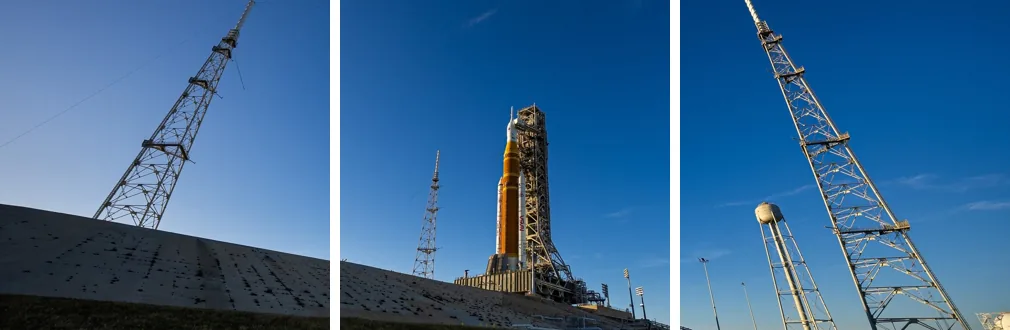
Put the tiles back together
Pasting each tile at its box's top-left corner rebuilds the original exactly, which is a good test for any splitting code:
import numpy as np
from PIL import Image

img = Image.open("photo.jpg")
rows, cols = 2, 3
boxes = [(c * img.width // cols, r * img.height // rows, (c + 1) * img.width // cols, (r + 1) * img.height // rows)
         for r in range(rows) for c in range(cols)]

canvas = Image.new(img.mode, img.size)
for box in boxes:
    canvas.paste(img.crop(box), box[:2])        # paste each tile back at its top-left corner
print("identical:", np.array_equal(np.asarray(canvas), np.asarray(img)))identical: TrueFor joining different images, see combining images side by side or in a grid.
Related
The outputs and images on this page are the real results of running every example with Pillow 12.3.0 on Python 3.13 (Linux) on 2026-10-15. Every example is also re-run automatically on macOS (Darwin 25.6.0, Pillow 12.3.0), Linux (Linux 6.17.0-1022-azure, Pillow 12.3.0), Windows (Windows 2025Server, Pillow 12.3.0); the line under each example shows the result per operating system. The DejaVu Sans font files sit next to each script so font examples behave the same everywhere. Sample photos: NASA/Sam Lott, public domain. Spotted something wrong? Tell us.